Microsoft Purview Label Inheritance for Attachments
Why Microsoft Purview Label Inheritance Is a Bigger Deal Than It Looks

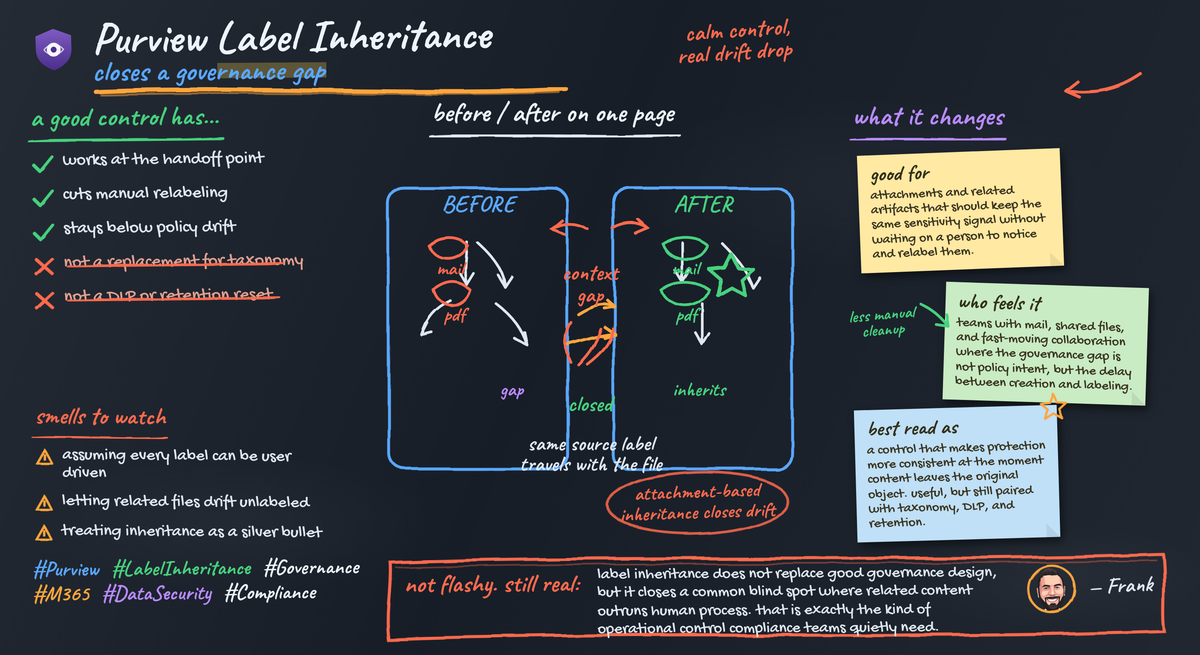
Purview label inheritance is underrated, and that is exactly why it matters.
The flashy compliance features get the budget conversation. The boring control that quietly cuts daily protection drift is usually the one that saves your team from cleanup work six months later.
On this page
- The quiet governance gap hiding in attachments
- Why inheritance changes the operating model
- The protection chain inheritance can reinforce
- Where label inheritance helps, and where it absolutely does not
- Treat this as a governance priority signal
- A rollout framework that won’t waste your quarter
- My bottom line
- Sources & References
If you run Microsoft 365 at any real scale, you already know the weak point: a document gets labeled, protected, and handled correctly once, then collaboration starts. Somebody uploads a related file. Somebody attaches an extract. Somebody creates a working version in a team site. Somebody drops a PDF into a library. Suddenly the protection posture depends on whether the next human in the chain remembers to reproduce the original classification decision.
That is not a user training problem. That is an operating model problem.
Microsoft Purview matters here because it brings data security and governance capabilities into a unified experience in the Purview portal. And one of the more practical moves in that stack is label inheritance. Not glamorous. Very useful.
The quiet governance gap hiding in attachments
Here is the gap nobody puts on the architecture slide: protected content creates related artifacts faster than users can label them.
That is where compliance drift shows up in the real world. Not usually from one dramatic failure. It comes from ordinary collaboration:
- a finance workbook gets emailed and re-saved
- a contract summary gets attached to a case file
- a board deck spawns speaker notes, PDFs, and extracts
- a protected SharePoint library gets a rush of uploads from a project team on deadline day
The original item may be labeled correctly. The downstream artifacts often are not.
Back in Q3, I was working with a 4,800-user business unit that had a clean sensitivity label design on paper and still ended up with a legal review queue full of unlabeled PDF attachments because project teams were generating related files faster than the review team could remediate them. That is the real problem inheritance addresses.
The value of inheritance is simple: it makes the expected protection state more durable across normal work. You stop asking every user to replay a governance decision that the system already knows.
Why inheritance changes the operating model
This is the part people miss. Attachment-based or related-content inheritance is not just a convenience feature. It changes where protection starts.
Instead of relying on users to remember, interpret, and reapply a label, you carry forward the protection context from the originating content or container. That means fewer unlabeled artifacts at birth, less relabeling later, and fewer weird exceptions where one file in a sensitive workflow is protected and the next one is floating around as “General” because nobody clicked the dropdown.
For SharePoint and OneDrive, supported Office files and PDFs can use built-in labeling in Office for the web, which is one of the foundations that makes this operationally useful in day-to-day collaboration per the Microsoft documentation for supported files. Purview also supports automatically applying sensitivity labels across Microsoft 365 data per the auto-labeling documentation.
That combination is the point:
- user-applied labels where users know the context
- automatic labeling where the platform can detect content
- inheritance where the right answer should follow the work
That is governance engineering. Not cosmetics.
A simple way to explain it to a security or compliance team is to show how a container-level decision can shape file defaults and access posture before the file chaos starts.
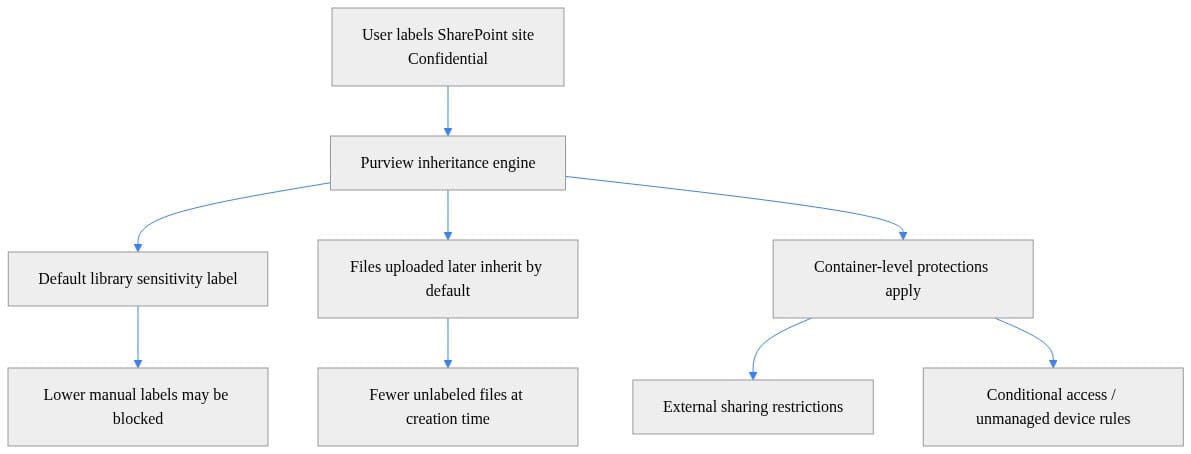
What to notice: the control is doing two jobs at once. It is setting a default classification path for files and reinforcing collaboration restrictions at the container level. That is why I keep saying this is bigger than a label picker improvement.
The protection chain inheritance can reinforce
Sensitivity labels are your classification layer. They establish business meaning and can drive protection behavior. But a label strategy only earns its keep when related content stays inside the same protection posture often enough to matter operationally.
Without that consistency, your model degrades into “well-labeled originals plus messy downstream exceptions.”
Here is the practical stack I use when I explain this to leadership teams:
- Sensitivity labels define the classification context.
- Inheritance helps carry that context into ordinary collaboration events.
- DLP analyzes content and activity patterns to catch policy-relevant data and movement.
- Retention decides lifecycle, not classification.
Purview DLP is important here because it is not just looking for exact strings. It analyzes content using keyword matches, regex, internal function validation, proximity-based secondary matches, and machine learning methods per the Purview DLP overview. That makes DLP the enforcement and detection layer you still need even if inheritance is working well.
And retention is a different control entirely. Retention policies determine whether content is retained, deleted, or retained and then deleted per the retention policy documentation. Inheritance does not solve lifecycle. It does not replace records management. It does not answer legal hold questions.
If you want a quick visual for the ops difference, compare “protect at creation” versus “scan and remediate later.”
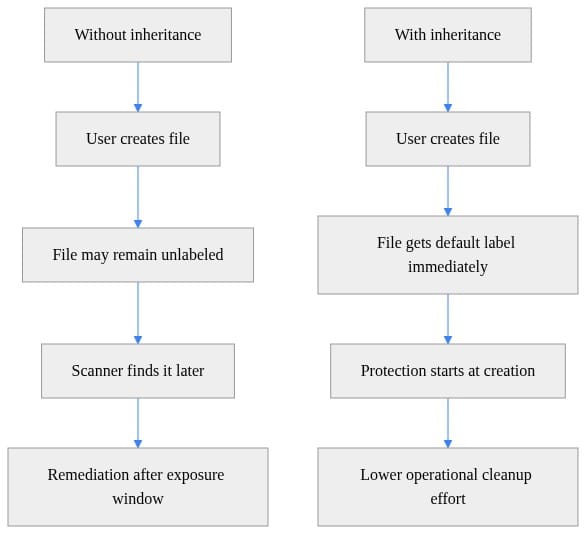
That is the whole argument in one diagram. Inheritance shifts protection left. Cleanup becomes the exception instead of the default operating mode.
Where label inheritance helps, and where it absolutely does not
I’m bullish on this capability, but I’m not going to pretend it fixes weak governance.
Where it helps
- It reduces routine gaps created by attachment and related-file workflows.
- It lowers dependence on user memory and user patience.
- It makes label-based handling more consistent in collaboration-heavy environments.
- It shrinks the window where new artifacts exist without the expected protection state.
Where it does not help
- It does not rescue a bad label taxonomy.
- It does not replace DLP tuning for your actual sensitive-data patterns.
- It does not replace retention policies aligned to legal and regulatory obligations.
- It does not eliminate testing across workloads, file types, exceptions, and user experience.
This is where teams get into trouble: they try to use inheritance as a bandage for ambiguous labels. If your users cannot tell the difference between “Confidential” and “Highly Confidential,” inheritance will propagate confusion faster.
Same story with ownership. If nobody owns the business meaning of labels, then inherited protection just scales the argument.
I’d start with a small, boring, high-confidence set:
- Executive or board materials
- Finance and forecast content
- HR investigation documents
- Active legal matter workspaces
- Product or engineering design libraries with clear sharing boundaries
Those are the places where unlabeled related content causes immediate downstream pain.
Treat this as a governance priority signal
The bigger strategic read is not just the feature itself. It is what Microsoft is optimizing for: lower-friction protection in environments where content is being created, transformed, attached, summarized, and redistributed constantly.
That matters even more now because AI accelerates content creation paths. More drafts. More derivatives. More extracts. More summaries. More chances for the protection posture to break in the handoff.
Microsoft is explicit that Purview plays a role in helping organizations manage risks associated with generative AI through protection and governance controls, per the Purview AI risk guidance. That is exactly why I view inheritance as a meaningful control. In an AI-heavy environment, anything that reduces reliance on repeated human classification decisions is worth serious attention.
This is also why I keep connecting Purview controls to broader AI governance work. If you are building out agent or Copilot controls, the same problem shows up in a different form: context spreads faster than governance decisions. I wrote about that in my Enterprise Microsoft 365 Copilot Agent Governance Playbook and again in Enterprise Agent Memory Governance for Microsoft AI. Same pattern, different surface area.
A rollout framework that won’t waste your quarter
Here is how I would deploy this in a real tenant without turning it into a six-month committee exercise.
1. Start with labels that already mean something
Pick two or three labels with clear business intent and low debate. If the organization still argues about what a label means, stop and fix that first.
2. Target workflows where unlabeled artifacts create real exposure
Do not start everywhere. Start where the cleanup burden is visible:
- case management sites
- finance team libraries
- M&A or due diligence workspaces
- HR restricted collaboration areas
3. Test inheritance with your existing controls, not in isolation
Run it alongside:
- auto-labeling
- DLP policies
- retention settings
- site and container restrictions
A lot of teams test one control in a lab and then act surprised when the user experience gets messy in production. I do a ton of this kind of validation in my home lab before I recommend rollout patterns broadly. My Proxmox/Azure setup exists for one reason: I want to break the workflow before users do.
This simple sequence is useful for explaining the mechanics to admins and architects before they get lost in policy screens.
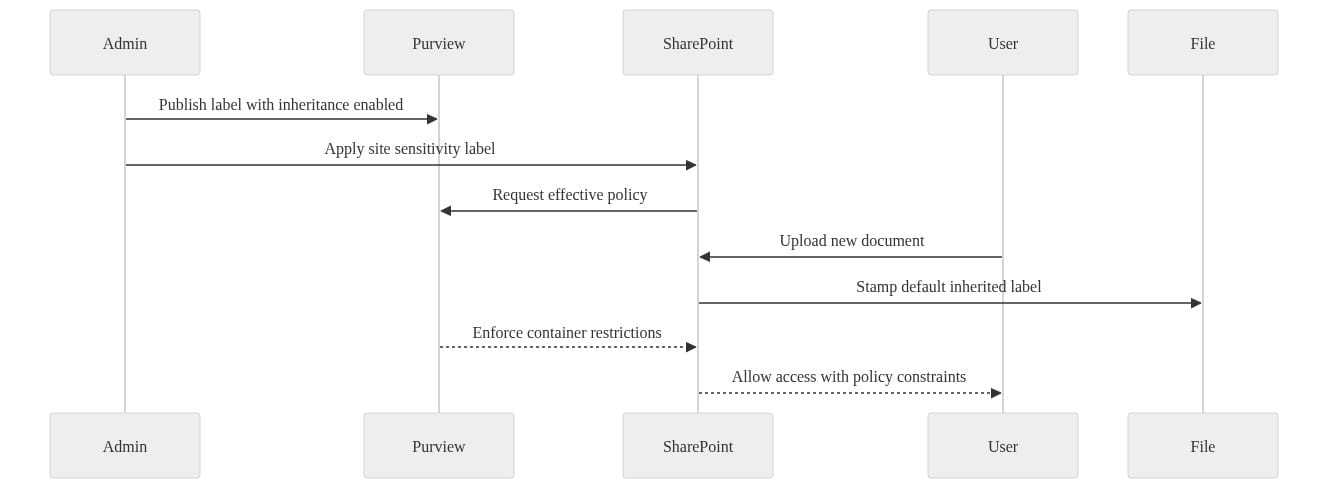
What to notice: the important moment is not after the file sits around unlabeled for a week. The important moment is when the file is created or uploaded and immediately receives the expected posture.
4. Measure operational outcomes, not just policy existence
I care about four numbers:
- percentage of new files protected at creation
- percentage of files needing reactive relabeling
- number of policy exceptions opened by business teams
- review hours spent on cleanup before and after rollout
If the control is working, the unlabeled gap window shrinks and the cleanup queue gets smaller.
Here is a lightweight dashboard-style example I’d use to frame the conversation with leadership.
# Summarize the operational value of inheritance for a rollout dashboard
$Metrics = [pscustomobject]@{
    SitesLabeled                    = 120
    LibrariesReceivingDefaultLabel  = 120
    NewFilesProtectedAtCreationPct  = 94
    FilesNeedingReactiveRelabelPct  = 6
}

$Metrics
"Key takeaway: inheritance shifts protection left and reduces cleanup workload."
What to notice: these are the metrics that prove the control is reducing drift, not just adding another checkbox to your compliance slide.
5. Use the findings to improve taxonomy
If inheritance exposes confusion, good. That is useful signal. Fix the taxonomy, user guidance, and ownership model. Do not hide label ambiguity under more automation.
My bottom line
Purview label inheritance is a bigger deal than it looks because it addresses one of the most common governance failure modes in Microsoft 365: the moment labeled content turns into related content and the protection posture starts to drift.
That is why I like it. It is mundane. It is operational. It attacks a real failure pattern instead of making the dashboard prettier.
For mature programs, the win is not magical compliance automation. The win is lower-friction consistency:
- fewer unlabeled artifacts
- fewer repeated user decisions
- more reliable downstream protections
- less cleanup work for already overloaded compliance teams
Use it as one control in a coordinated model:
- classification through sensitivity labels
- enforcement through DLP
- lifecycle through retention
- governance guardrails for AI-enabled collaboration
That is the grown-up way to deploy Purview.
Where does this break in your environment: weak label taxonomy, messy SharePoint sprawl, or DLP policies that already generate too much noise?
#Microsoftpurview #Datagovernance #Microsoft365
Sources & References
- Study guide for Exam SC-900: Microsoft Security, Compliance, and Identity Fundamentals
- Security and governance - Microsoft Copilot Studio
- Enable sensitivity labels for files in SharePoint and OneDrive
- Microsoft Purview data security and compliance protections for Microsoft 365 Copilot and other generative AI apps
- Sensitivity Labels in Power BI - Microsoft Purview Information Protection
- Automatically retain or delete content by using retention policies
- Learn about data loss prevention
- Learn about the Microsoft Purview portal
- Automatically apply a sensitivity label to Microsoft 365 data
- Learn about retention for SharePoint and OneDrive
Try it yourself
Run this tutorial as a Jupyter notebook: Download runbook.ipynb (26 cells, 16 KB).