Clinical AI Agent Governance Checklist for Dragon Copilot
My first production checklist for Dragon Copilot agents: start with governance, not the demo

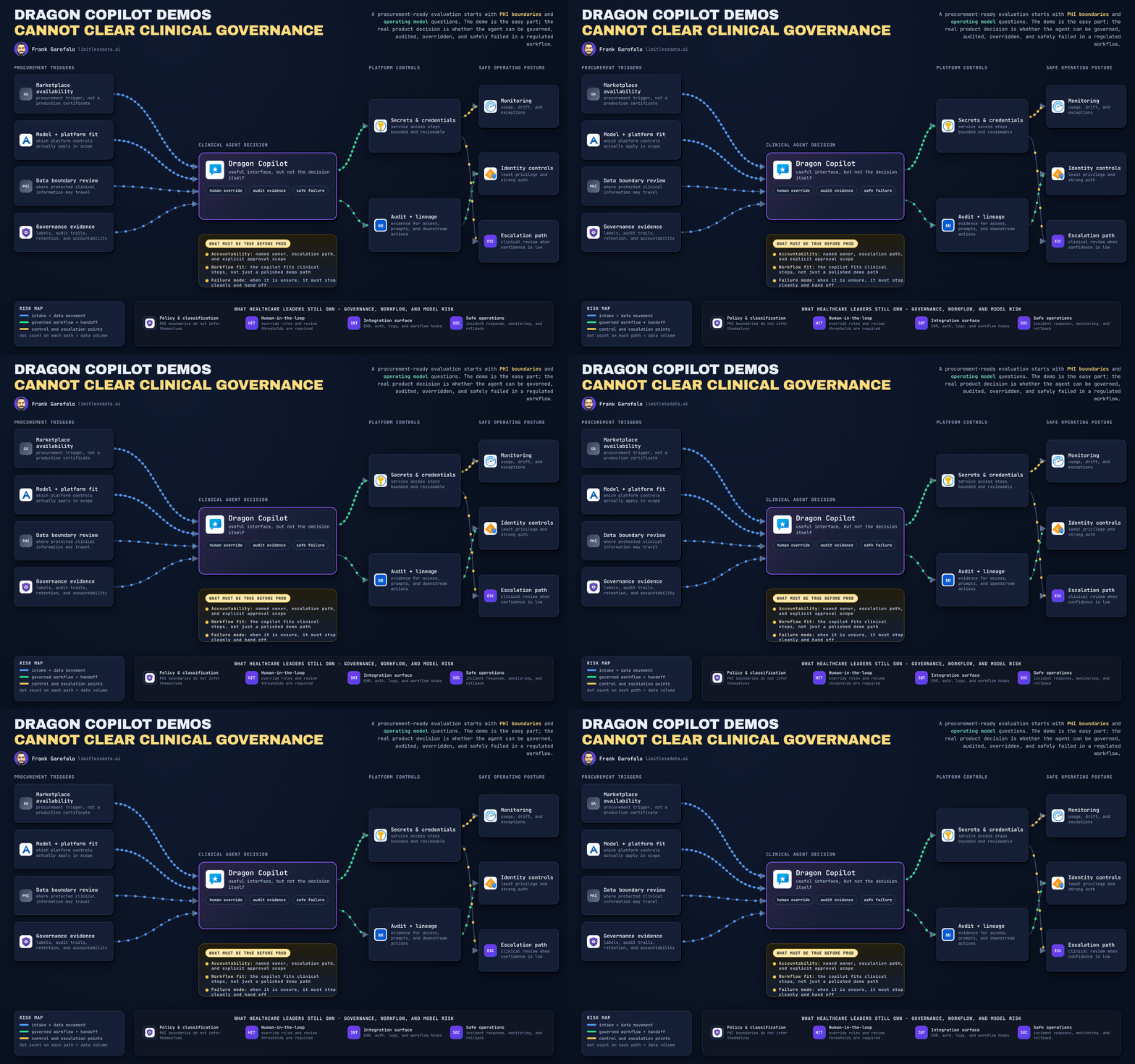
Dragon Copilot hit Marketplace, and a lot of teams are about to confuse “easier to buy” with “ready to run.” Last month I sat in a review where a gorgeous clinical AI demo got a room of smart leaders nodding yes, and not one person could answer where the transcript would live, who could retrieve it, or who had kill-switch authority if the workflow went sideways.
On this page
- The Marketplace moment is a governance moment
- Why a polished clinical demo is the wrong acceptance test
- Checklist 1: Draw the data boundary before scoring features
- Checklist 2: Make auditability and human override operational
- Checklist 3: Test workflow fit and integration dependencies
- Checklist 4: Define clinical failure modes before pilot expansion
- A procurement-stage decision gate for CDOs and CMIOs
- My blunt take
- Sources & References
That’s the whole point of this post.
If you’re a CDO, CMIO, CIO, privacy lead, or the poor soul who always gets called after procurement signs the paper, your first production checklist for Dragon Copilot agents should start with governance, not the demo. In healthcare, the operating model is the product decision.
The Marketplace moment is a governance moment
Marketplace availability is a procurement trigger, not a production certificate.
I like seeing more domain-specific AI show up in channels enterprises already trust. That lowers friction. It does not lower responsibility. A clinical interface can absolutely improve adoption and reduce user training time. Great. That still leaves the hard questions sitting on your desk:
- What PHI enters the system?
- Where is it processed?
- What gets retained?
- What leaves the workflow?
- Who approves access?
- What gets audited?
- Who owns failure at 2:13 AM?
Microsoft is very clear that governance is part of the platform story. Copilot Studio follows controls and processes that include geographic data residency, DLP, standards certifications, regulatory compliance, environment routing, and regional considerations, per the Copilot Studio security and governance docs. Good. That gives you a control surface. It does not answer whether your specific health system, workflow, and risk posture are production-ready.
That distinction matters more in clinical AI than almost anywhere else.
Why a polished clinical demo is the wrong acceptance test
The demo bar is simple: a clinician asks a question, the agent responds smoothly, everyone smiles.
The enterprise-readiness bar is much higher:
- safe data handling
- predictable integration behavior
- auditable actions
- support ownership
- human override
- reversible deployment
- failure containment
A successful interaction proves almost nothing about those.
Back in Q4, I watched a 14-person informatics and data platform team spend three weeks validating note-quality output while a basic access review later found two downstream service accounts with broader permissions than the clinicians using the tool. That’s how teams get burned: they optimize the visible part first.
Clinical context raises the consequence of every “looks plausible” failure mode. Wrong, incomplete, delayed, stale, or misrouted output is annoying in a marketing workflow. In a clinical workflow, it can become documentation error, patient-safety risk, or an ugly compliance event.
Microsoft’s broader Copilot guidance for IT pros already frames deployment as privacy, architecture, security, governance, planning, implementation, and management work, not just user experience work, per the Microsoft 365 Copilot documentation hub. That’s the frame I’d use for Dragon Copilot evaluation too.
Checklist 1: Draw the data boundary before scoring features
Before you rank voice quality, summarization quality, or interface polish, draw the data boundary.
I want a one-page answer to these questions before anyone says “pilot”:
- What data enters the agent?
- What data is transformed in-flight?
- What is stored, and for how long?
- What metadata and telemetry are captured?
- Who can retrieve prompts, outputs, transcripts, and attachments?
- What leaves the clinical workflow through exports, handoffs, APIs, or copied text?
If your team cannot produce a PHI inventory, you are not evaluating a production system. You are watching a demo.
That inventory should explicitly cover:
- prompts
- generated outputs
- transcripts
- attachments
- citations or source references
- telemetry
- support access paths
- exports
- downstream integrations
- audit records
Then assign owners. Not “the AI team.” Named people.
- Privacy owner
- Security owner
- Clinical informatics owner
- Data governance owner
- Legal owner
- Procurement owner
- Operations owner
If you want a simple way to socialize this with architecture and governance teams, I use a gate like this to force the conversation before any build moves forward:
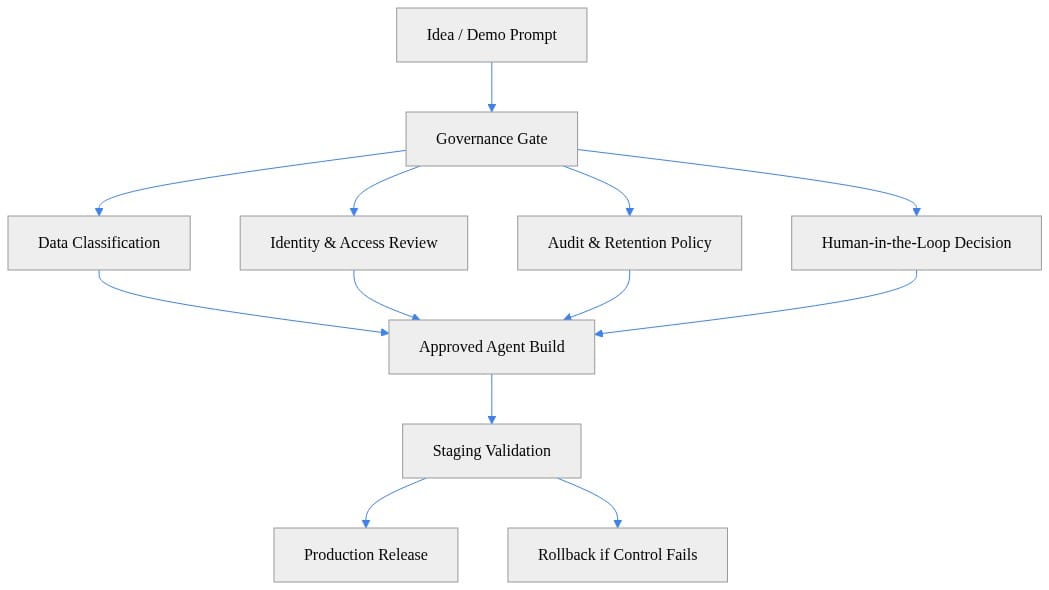
What to look for: the build path only starts after data classification, access review, audit policy, and human-in-the-loop decisions are cleared. That sequencing is the point.
If you’re already working through adjacent agent reviews, I laid out a similar pattern in my post on Copilot Studio evaluation for agent governance. Same lesson here: classify the operating risk before you admire the UX.
Checklist 2: Make auditability and human override operational
“Auditability” gets thrown around like a checkbox. In production, it needs to be reconstructable.
After an incident, I want to know:
- who initiated the interaction
- patient or workflow context available at that moment
- source systems consulted
- exact agent action taken
- draft or recommendation produced
- approvals requested
- edits made by the user
- overrides applied
- integrations invoked
- timestamps for every step
That’s not legal theater. That’s how you separate user error, model error, integration error, and policy failure.
You also need to separate assistance from autonomy. Those are different risk classes.
An agent can:
- inform
- draft
- recommend
- route
- execute
Each step up that ladder needs tighter controls. In a clinical setting, documentation finalization, order-adjacent actions, exception handling, and anything that materially changes the record should have explicit human review gates.
Here’s a minimal illustration I use with teams when they’re still talking too abstractly about “human in the loop”:
# Human-in-the-loop wrapper for high-risk actions
def execute_action(action: str, approved: bool) -> str:
    if not approved:
        return f"BLOCKED: '{action}' requires human approval"
    return f"EXECUTED: '{action}'"

for approved in (False, True):
    print(execute_action("update_clinical_note", approved))
What to look for: high-risk actions should fail closed when approval is missing. If your design cannot block the action cleanly, you do not have a usable control.
I also want a documented correction path. If the output is unsafe, incomplete, or misrouted, who withdraws it? How fast? Through what mechanism? Who gets paged? If nobody has that answer, then nobody owns production.
For a broader governance pattern around these controls, my Microsoft Foundry agent governance production checklist covers the same operational muscle most teams skip.
Checklist 3: Test workflow fit and integration dependencies
Vendor demos show the happy path. Clinical operations run on the messy path.
Map the real workflow:
- Who starts the interaction?
- Who validates the result?
- Where does the output land?
- Who owns the handoff?
- What happens if the clinician walks away mid-stream?
- What happens if the EHR, API, or knowledge source is slow or stale?
This is where a lot of “great AI” projects die. Not because the model is bad. Because the workflow fit is bad.
You also need a dependency inventory:
- identity provider
- RBAC model
- service identities
- APIs
- clinical systems
- knowledge sources
- environment config
- logging sinks
- support tooling
And yes, credential design belongs in the architecture review. In production, I do not want mystery fallback behavior. Microsoft’s Azure Identity guidance explains that DefaultAzureCredential is useful for local development and flexible environments, while production deployments often benefit from a more explicit credential choice such as ManagedIdentityCredential to avoid unintended credential chaining and make authentication behavior more predictable, per the Azure Identity client library for .NET overview. That’s exactly the kind of detail that separates a clean deployment from a future incident review.
A simple preflight policy model helps teams stop arguing in PowerPoint and start enforcing actual conditions:
# Governance-first agent policy model
from dataclasses import dataclass, field
from typing import List

@dataclass
class AgentPolicy:
    name: str
    data_classes_allowed: List[str]
    pii_allowed: bool
    human_approval_required: bool
    audit_retention_days: int
    approved_tools: List[str] = field(default_factory=list)

policy = AgentPolicy(
    name="dragon-copilot-prod",
    data_classes_allowed=["public", "internal"],
    pii_allowed=False,
    human_approval_required=True,
    audit_retention_days=365,
    approved_tools=["ehr_lookup", "kb_search"],
)

print(policy)
What to look for: this example is intentionally blunt. Data classes, PII handling, human approval, retention, and approved tools are all explicit. If your policy is buried in meeting notes, it’s not a policy.
Then add a deployment gate that blocks release when controls are missing:
# Block deployment when governance controls are missing
$Deployment = @{
    Name                = "dragon-copilot-prod"
    HasMfa              = $true
    HasAuditSink        = $true
    HasHumanApproval    = $false
    DataClassification  = "internal"
}

$errors = @()
if (-not $Deployment.HasMfa) { $errors += "MFA is required." }
if (-not $Deployment.HasAuditSink) { $errors += "Audit sink is required." }
if (-not $Deployment.HasHumanApproval) { $errors += "Human approval is required." }
if ($Deployment.DataClassification -notin @("public", "internal")) { $errors += "Data class not approved." }

if ($errors.Count -gt 0) { $errors | ForEach-Object { Write-Error $_ } } else { "Deployment approved." }
What to look for: failed controls should stop the release, not generate a follow-up task. Production review should be binary on the critical controls.
Microsoft also draws a useful line between simpler declarative agents and more complex requirements. Agent Builder in Microsoft 365 Copilot is for declarative agents, while broader and more complex requirements push you toward Copilot Studio capabilities, per the Agent Builder documentation. In healthcare, that distinction matters because complexity usually arrives through integration, policy, and audit demands long before it arrives through UI demands.
Checklist 4: Define clinical failure modes before pilot expansion
Do this before the first broad pilot, not after the first ugly surprise.
I want tabletop scenarios for:
- omission of clinically relevant detail
- incorrect summarization
- unsupported confidence
- stale context
- wrong-patient context
- access-control failure
- integration timeout
- workflow interruption
- duplicate action
- failed write-back
- hidden dependency outage
For each one, write down:
- how it is detected
- immediate containment step
- user communication
- clinical escalation path
- audit capture required
- recovery procedure
- post-incident review owner
Then define stop conditions. Real ones.
Examples:
- repeated wrong-context incidents
- unresolved audit gaps
- unexplained output drift
- access model exceptions
- dependency instability beyond agreed threshold
- inability to reconstruct a critical event
And decide who can pause the agent. If the answer is “we’ll escalate and discuss,” that means nobody can pause the agent.
Usage is not a production-readiness metric. Adoption matters, but safety and operability matter more. The Microsoft 365 developer platform positioning is useful here because it treats enterprise-grade agents as part of a broader app and platform operating model, not a standalone chat surface, per the Microsoft 365 developer platform guidance. That’s the right mental model.
A procurement-stage decision gate for CDOs and CMIOs
Here’s the governance evidence pack I’d request before broad rollout:
- data-flow documentation
- PHI inventory
- control mapping
- access model
- environment and routing decisions
- audit artifact examples
- integration architecture
- support model
- failure-mode test plan
- rollback criteria
- named operational owners
I also classify intended use on two axes:
- Consequence if wrong
- Degree of autonomy
That gives you a practical approval depth.
- Low consequence + low autonomy: lighter review
- High consequence + low autonomy: strong audit and human review
- Low consequence + high autonomy: strong ops review
- High consequence + high autonomy: hardest gate, often no-go without major control evidence
If you need a simple release checklist to make that visible to leadership, this kind of summary works well:
# Simple release checklist report for a production-ready agent
$Checklist = [PSCustomObject]@{
    GovernanceOwner      = "Assigned"
    DataClassification   = "Reviewed"
    AccessControls       = "Enabled"
    AuditLogging         = "Enabled"
    HumanInTheLoop       = "Enabled"
    RollbackPlan         = "Documented"
}

$Checklist | Format-List
What to look for: every line should map to a named owner and an artifact, not a verbal assurance.
And if your organization is already dealing with Copilot sprawl, this is the same governance problem wearing scrubs. I made that point in Microsoft 365 Copilot adoption, burnout and governance because the pattern repeats: once the tool gets easy to access, teams skip the operating model.
My blunt take
If you’re evaluating Dragon Copilot, buy the governance path and operating model first.
The demo can earn its place after that.
A domain-specific clinical experience may absolutely improve adoption. I’d expect it to in the right workflow. But procurement-stage confidence should come from evidence around PHI boundaries, accountability, integrations, auditability, human override, and safe failure. That is the real product decision.
The teams that get this right will move slower for two weeks and faster for two years.
Rate your organization’s current agent-readiness on this specific standard from 1 to 5: could you pause a clinical agent today, reconstruct its last harmful action, and prove who owned the decision path?
#Healthcareai #Aigovernance #Clinicalinformatics
Sources & References
- Official Microsoft Power Platform documentation - Power Platform
- Microsoft Copilot hub
- Security and governance - Microsoft Copilot Studio
- Azure Identity client library for .NET overview
- Microsoft 365 developer documentation - Microsoft 365 Developer
- Architect AI Solutions For Business Productivity - Training
- Agent Builder in Microsoft 365 Copilot
- Choose between Agent Builder in Microsoft 365 Copilot and Copilot Studio to build your agent
- Study guide for Exam AB-900: Microsoft 365 Copilot and Agent Administration Fundamentals
- Transform Your Everyday Business Processes with Agents MS-4019 - Training
Try it yourself
Run this tutorial as a Jupyter notebook: Download runbook.ipynb (36 cells, 26 KB).