Copilot Studio SQL Server Governance for Enterprise AI
Why Copilot Studio’s New SQL Server Support Matters for Enterprise AI Workflows

“Can we just let the Copilot hit SQL directly?”
On this page
- The connector is not the story
- Why direct SQL access redraws the solution boundary
- Replace API-only contortions without discarding integration architecture
- Approval models must become agent-aware
- Least privilege is the design center
- Auditability becomes a product requirement
- Avoid the low-governance chatbot trap
- What architecture leaders should do now
- Sources & References
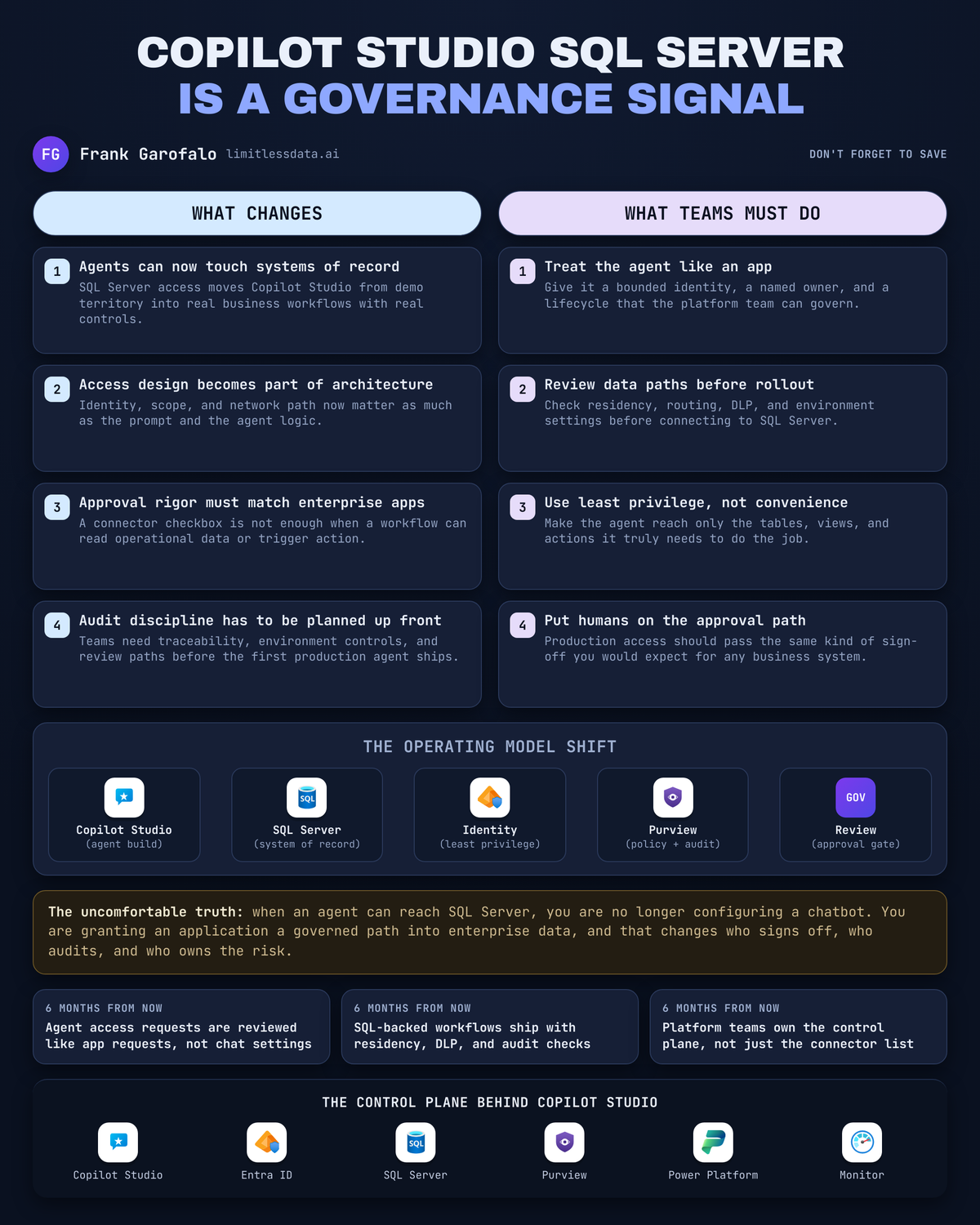
That question changes the architecture review immediately. Once a Copilot Studio workflow can reach SQL Server, you are no longer configuring a chatbot. You are authorizing an application path into a system of record.
I’m bullish on this direction, and I’m also going to be blunt: the connector is not the story. The story is that Microsoft keeps moving Copilot Studio deeper into real enterprise execution, inside the same Power Platform estate that already carries apps, flows, analytics, and web experiences per the Power Platform documentation. If you’re a Microsoft-first shop, that means your agent lifecycle now belongs in the same approval, identity, and audit conversations as every other business application.
The connector is not the story
A lot of teams will read “SQL Server support” and file it under feature velocity. Nice connector. Nice demo. Nice way to answer a question from a line-of-business table.
That’s the wrong read.
There’s a massive architectural difference between:
- letting an agent summarize low-risk knowledge content, and
- letting an agent workflow retrieve or act on operational data from SQL Server
The first one is content access. The second one is application architecture.
That distinction matters because systems of record come with real boundaries:
- data permissions
- transaction semantics
- production support ownership
- change control
- audit evidence
- blast radius when something goes wrong
Back in Q4, I sat in a review with a 14-person operations team that had built a “helpful internal bot” over a support database; three months later it was effectively the fastest path to customer escalation status, nobody could explain which service account it used, and the first serious question from audit shut the whole thing down in 48 hours.
That’s exactly why this update matters.
Copilot Studio is designed for organizations building conversational and agent experiences, but Microsoft also puts real emphasis on security and governance controls like data loss prevention, environment routing, regional considerations, and compliance posture in the Copilot Studio security and governance docs. Read that as a signal: if the platform can reach important data, you’re expected to govern it like it matters.
And before anybody commits to a design based on a conference slide or a screenshot from social media, check the current Copilot Studio release information for the exact scope, auth model, supported operations, and current limitations. Architecture decisions built on rumor are how you end up rewriting things twice.
Why direct SQL access redraws the solution boundary
The old pattern was cleaner.
Agents sat in front of:
- curated knowledge bases
- approved APIs
- Power Automate flows
- retrieval layers somebody had already constrained
That gave you a natural choke point. The agent could ask for something, but the boundary between language and operational data was mediated.
Direct SQL access moves that boundary closer to the database.
Here’s the simple version of the new shape:
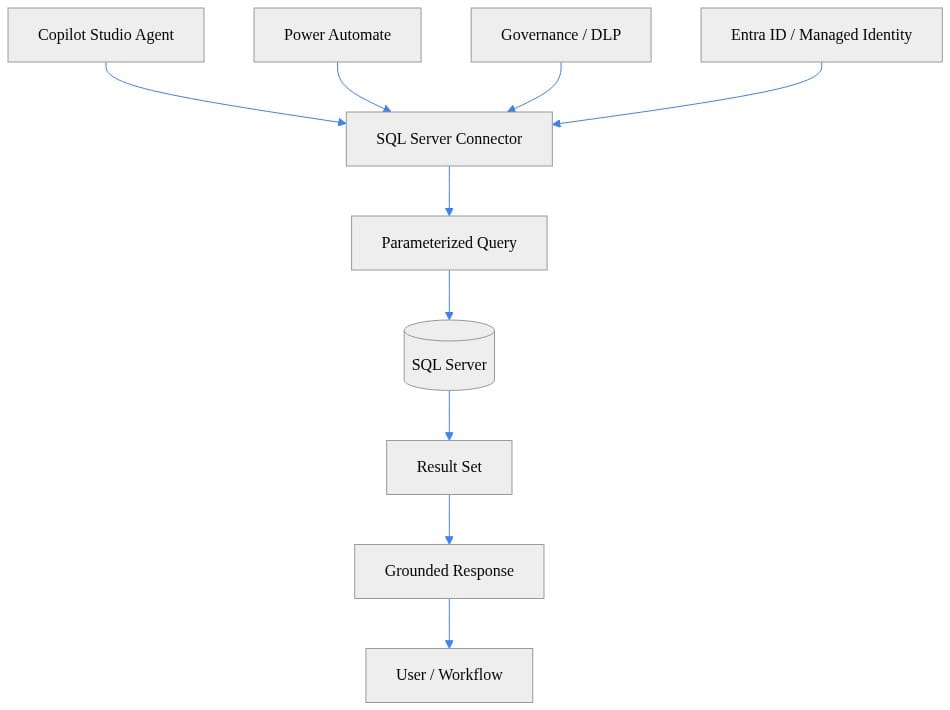
What I want you to notice in that diagram is the control plane around the connector. The agent is not the only thing that matters. Identity, DLP, and workflow orchestration all sit on the path. If you design this as “user asks question, database answers question,” you’re already missing the hard part.
The right boundary now is least authority, not convenience.
That means you separate two categories immediately:
1. Read-oriented grounding
- “Show me the latest open tickets for account 123”
- “What tier is this customer in?”
- “Summarize delayed orders in EMEA”
These are often good candidates for narrow, controlled SQL-backed retrieval.
2. Operational actions
- update a case
- release an order hold
- change a customer flag
- trigger a downstream financial or compliance event
These should never ride in under the same casual approval model as a read-only lookup. Once the workflow changes state, ownership and control need to be explicit.
If you’ve read my take on Copilot Studio Agent Node Just Moved Beyond Chat, this is the same pattern at a more serious boundary: capabilities that look conversational on the surface are actually architecture decisions underneath.
Replace API-only contortions without discarding integration architecture
Let me say the quiet part out loud: a lot of enterprise teams built ugly API wrappers for no good reason.
I’ve seen organizations stand up thin services that did almost nothing beyond:
- accept one parameter
- run one SQL query
- reshape five columns
- return JSON to a bot
Now you own:
- another deployment artifact
- another authentication surface
- another monitoring path
- another failure point
- another undocumented transformation nobody remembers six months later
For bounded internal workflows, direct governed SQL access can be cleaner than an API-only contortion.
But don’t overcorrect.
APIs still win when you need:
- reusable business logic
- a stable contract for multiple consumers
- transaction orchestration
- domain ownership boundaries
- external exposure
- versioning discipline
SQL support is not a replacement for integration architecture. It does not eliminate Fabric patterns. It does not eliminate Azure-native app design. It does not magically make database access the right answer for every workflow.
My rule is simple:
- Curated knowledge for broad answers
- API or automation for governed actions
- Narrow SQL access for justified operational lookups inside bounded internal scenarios
That’s the decision model.
Here’s a tiny Python example that shows the shape I want for read access: parameterized query, one record, no freestyle SQL generation.
# Python: Read enterprise data from SQL Server with a parameterized query
import os
import pyodbc

conn_str = (
    "DRIVER={ODBC Driver 18 for SQL Server};"
    f"SERVER={os.getenv('SQL_SERVER', 'tcp:sql01.contoso.com,1433')};"
    f"DATABASE={os.getenv('SQL_DATABASE', 'SalesOps')};"
    "Encrypt=yes;TrustServerCertificate=no;"
    f"UID={os.getenv('SQL_USER', 'app_reader')};"
    f"PWD={os.getenv('SQL_PASSWORD', 'ChangeMe!')};"
)

customer_id = 42
with pyodbc.connect(conn_str) as conn:
    cursor = conn.cursor()
    cursor.execute(
        "SELECT CustomerId, Name, Tier FROM dbo.Customers WHERE CustomerId = ?",
        customer_id,
    )
    row = cursor.fetchone()
    print({"CustomerId": row.CustomerId, "Name": row.Name, "Tier": row.Tier} if row else {})
Observe what’s intentionally boring here. Fixed connection pattern. Parameterized lookup. Minimal output. That’s good. If your agent access pattern starts by giving a workflow broad table access and hoping prompts keep it safe, you’ve already failed the design review.
And after retrieval, shape the result into grounded context instead of dumping raw rows into a response path:
# Python: Shape SQL results into grounded context for an AI workflow
import json

rows = [
    {"OrderId": 1001, "Status": "Delayed", "Region": "EMEA"},
    {"OrderId": 1002, "Status": "OnTime", "Region": "EMEA"},
]

grounding_payload = {
    "source": "sqlserver://SalesOps/dbo.Orders",
    "record_count": len(rows),
    "facts": rows,
    "instructions": "Answer only from these records. If missing, say data not found.",
}

print(json.dumps(grounding_payload, indent=2))
The point is discipline. Retrieved data should become constrained facts for the workflow, not a free-form invitation for the agent to improvise.
For a related governance angle, I made the same argument in Fabric Data Agent API Just Turned Governance Into Architecture: once the AI path reaches governed enterprise data, architecture and governance collapse into the same conversation.
Approval models must become agent-aware
A traditional connector approval is too shallow for this.
Why? Because the consuming experience is not a static app screen with a fixed button path. It is a natural-language interface that can interpret requests, choose actions, and chain workflows.
That means approval has to become layered.
My minimum model looks like this:
1. Data owner approval
Who owns the underlying data set? Not the platform. Not the prompt author. The actual business owner.
2. Platform owner approval
Which environment, connector policy, and lifecycle controls apply?
3. Security review
What identity is used? What is the authorization scope? What is the exfiltration risk through outputs?
4. Environment policy validation
Copilot Studio governance controls exist for a reason. Use DLP, environment strategy, and regional controls from day one, not after the first incident.
5. Business-process accountability
If the agent produces a wrong answer or causes a bad downstream action, who owns remediation?
You also need an inventory. A real one. Not a spreadsheet somebody updates quarterly when they remember.
For each agent, track:
- database
- schema
- table/view/procedure scope
- connection identity
- environment
- data classification
- action capability
- owning team
- approval date
- change history
And yes, changes to prompts, instructions, actions, connection identities, and data scope are governance-relevant changes. Treat them that way.
Microsoft’s broader enterprise guidance around Copilot also leans hard into architecture, privacy, and governance for deployment planning in the Microsoft 365 Copilot documentation. Different product surface, same enterprise lesson: AI access paths need operating discipline.
Least privilege is the design center
This is where most teams get lazy.
Do not use:
- shared admin identities
- broad application accounts
- “temporary” elevated access that becomes permanent
- production connections as a test harness
Use purpose-built identities for purpose-built workflows.
If the use case is “look up top 5 open support tickets,” then the connection should only be able to do exactly that class of work. Prefer:
- narrow views
- stored procedures
- approved query surfaces
- allow-listed objects
- read-only roles where possible
This little example shows the mentality I want: constrain what can even be queried before the workflow gets near production data.
# Python: Enforce least-privilege query patterns for enterprise AI access
ALLOWED_TABLES = {"dbo.Customers", "dbo.Orders", "dbo.SupportTickets"}

def build_safe_query(table: str, where_column: str) -> str:
    if table not in ALLOWED_TABLES:
        raise ValueError("Table not allowed")
    if where_column not in {"CustomerId", "OrderId", "Status"}:
        raise ValueError("Column not allowed")
    return f"SELECT TOP 10 * FROM {table} WHERE {where_column} = ?"

sql = build_safe_query("dbo.SupportTickets", "Status")
print(sql)
What to notice: the control starts before execution. Allowed tables. Allowed columns. Small result set. That is miles better than a “smart” prompt trying to talk a general-purpose query path into behaving.
In my home lab, I test this stuff the same way I’d expect a serious enterprise team to test it: separate dev, test, and prod paths on isolated workloads, explicit secrets handling, and no silent promotion of a successful experiment into a production dependency. My Proxmox cluster is great for proving one thing fast: convenience is the enemy of access design.
Also, Copilot Studio controls are necessary but not sufficient. DLP and environment policies help govern the platform layer, but they do not replace database authorization design. If the SQL identity can see too much, the platform cannot save you from a bad permission model.
If this topic is live for your team, my Enterprise Microsoft 365 Copilot Agent Governance Playbook is the companion read. Same principle, different control surface.
Auditability becomes a product requirement
If your team cannot explain what happened, you did not build an enterprise workflow. You built a demo with a help desk ticket waiting to happen.
For SQL-connected agent workflows, the evidence bar should include:
- who invoked the agent
- what request was made
- which action path was selected
- which connection identity was used
- what data scope was requested
- what rows or result class were returned
- what response was shown
- whether any operational state changed
That means you need both:
- conversational observability
- database auditing
One without the other is incomplete.
A sequence like this looks simple to the user, but every step needs to be reconstructable after the fact:
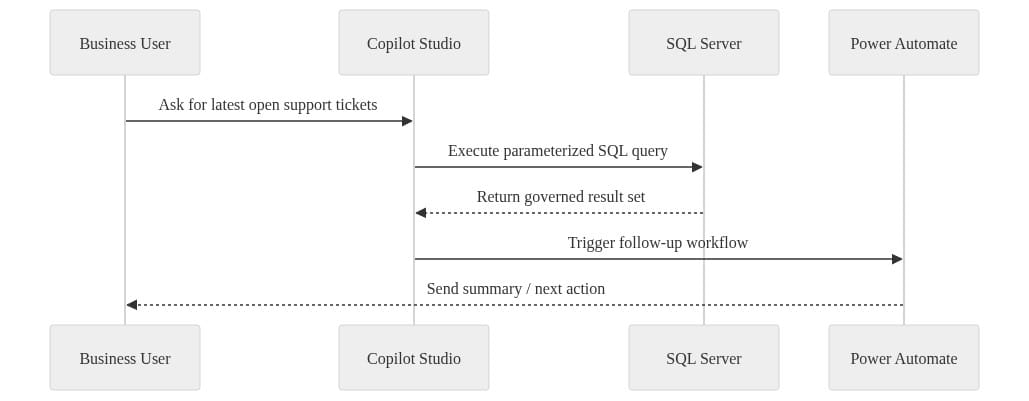
What to do next: map each hop in that sequence to an actual log source and retention policy. If you can’t answer “where would I investigate this?” for every hop, you’re not ready for production.
Natural-language interfaces are deceptive because they compress complexity. One innocent-looking question can trigger sensitive retrieval, ambiguous interpretation, and a consequential action path in a few seconds. That’s why auditability is not a compliance add-on here. It’s part of the product design.
Microsoft’s direction across enterprise agent development keeps reinforcing this point. The company frames these experiences as enterprise-grade agents and apps in the Microsoft 365 developer documentation. Good. That’s exactly how they should be treated.
Avoid the low-governance chatbot trap
Here’s the trap:
- Team launches a useful internal chatbot
- Someone adds a powerful connector
- More use cases pile on
- The bot becomes a de facto operational interface
- Nobody owns it like an application
- Audit, security, or production support eventually notices
I’ve watched this movie enough times to know the ending.
The fix is not to block everything. The fix is to start bounded.
Start with:
- one read-focused scenario
- one defined user population
- one classified data set
- one accountable owner
- one audit path you can actually explain
Do not start with write-back workflows unless you already have:
- identity clarity
- approval rigor
- output controls
- incident response
- process ownership
Governance is not the brake pedal here. It’s how you avoid rebuilding the whole thing after your first meaningful success.
What architecture leaders should do now
If you lead data, architecture, security, or platform engineering in a Microsoft-heavy estate, here’s the practical move.
Build a reference pattern
Define when to use:
- SQL access
- APIs
- Power Automate
- curated knowledge
- Fabric
- Azure-native services
Make teams choose intentionally instead of defaulting to whatever got demoed last.
Create a connection review checklist
At minimum:
- data classification
- identity model
- authorization scope
- output exposure risk
- audit evidence
- environment strategy
- lifecycle ownership
Pilot one read-first workflow
Pick a high-value scenario with low write risk. Prove you can govern retrieval before you approve operational changes.
Force ownership onto the workflow
Every agent with system-of-record access needs named ownership across business, platform, and security.
My opinion is simple: SQL Server support matters because it moves Copilot Studio closer to the operating core of the enterprise. That’s good news for useful AI workflows. It’s also the moment architecture discipline has to move closer to the agent lifecycle.
Rate your team’s current readiness for SQL-connected agents from 1 to 5 — and be honest about whether you have the audit trail to defend the answer.
#Copilotstudio #EnterpriseAI #DataArchitecture
Sources & References
- Security and governance - Microsoft Copilot Studio
- What's new in Copilot Studio - Microsoft Copilot Studio
- Official Microsoft Power Platform documentation - Power Platform
- Microsoft 365 Copilot hub
- Microsoft 365 developer documentation - Microsoft 365 Developer
Try it yourself
Run this tutorial as a Jupyter notebook: Download runbook.ipynb (27 cells, 22 KB).