Fabric Local MCP as an Enterprise Agent Runtime Strategy
How Fabric Local MCP Could Turn Microsoft Fabric Into an Agent Runtime

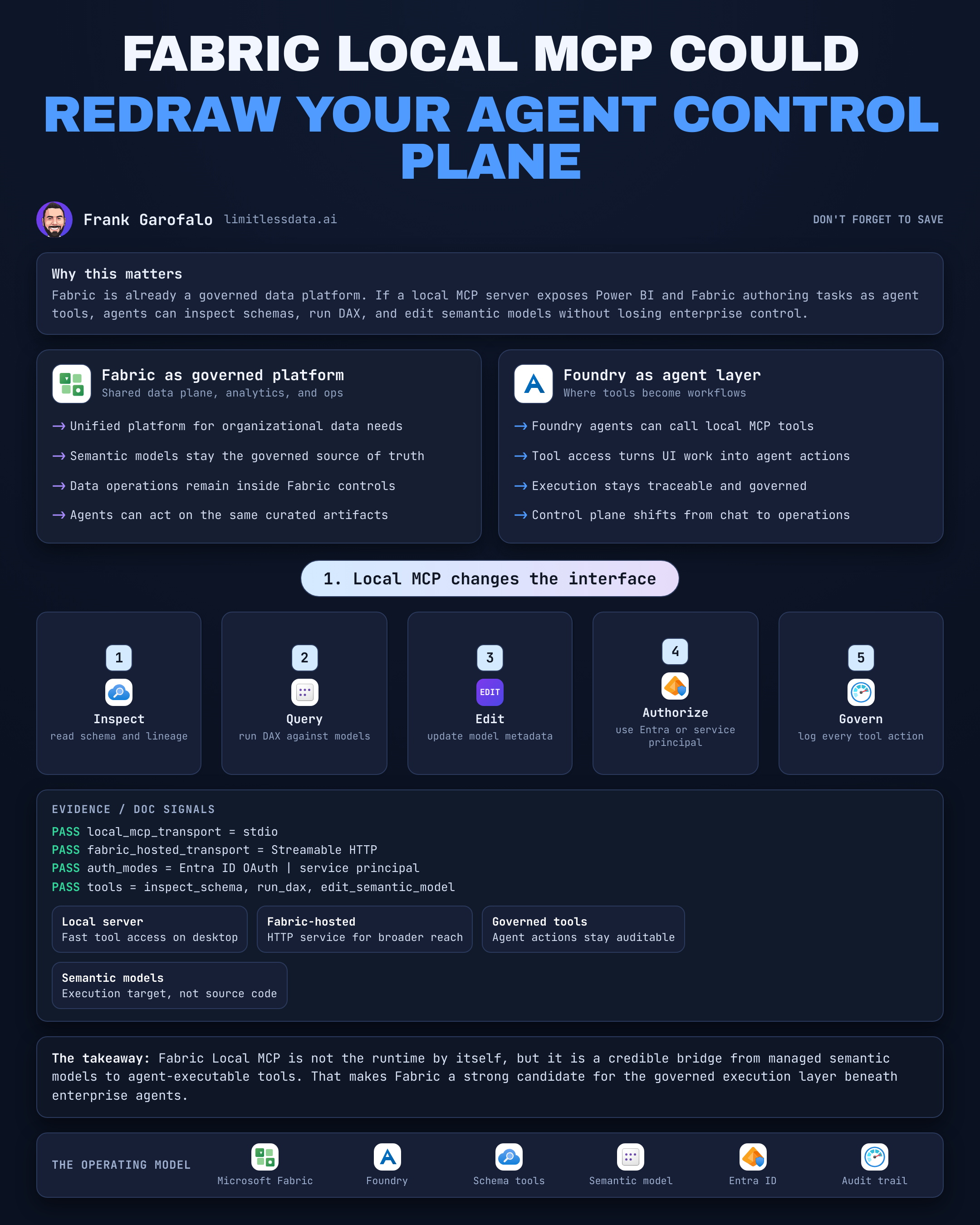
3 tool calls matter more than 30 chatbot demos. The biggest Fabric agent story may start when a local MCP server turns semantic models and data operations into governed tools instead of another shiny conversation.
On this page
- The agent runtime opportunity hiding inside Fabric
- What local MCP actually changes
- The emerging Fabric agent stack
- Why semantic models are the strategic control point
- Local first is powerful, but it is not the finish line
- A governance agenda before agents gain write access
- The decision for Fabric leaders
- My blunt take
- Sources & References
I’m bullish on this direction for one reason: it moves Fabric closer to the part that actually matters in the enterprise stack—the execution layer where agents can inspect business semantics, run analytical actions, and eventually propose governed changes. Microsoft Fabric is already documented as a unified analytics platform for organizational data and analytics needs in the Fabric docs. The new twist is the tool boundary.
That boundary is MCP.
And if you’re a data leader, architect, or Fabric builder, you should stop asking “does Fabric have a chatbot?” and start asking “can my agents use governed Fabric capabilities as tools with identity, boundaries, and audit?”
The agent runtime opportunity hiding inside Fabric
A lot of people are looking at Fabric agent stories through the lens of conversational analytics. That’s too small.
An agent experience is easy to demo. An agent runtime is harder and more valuable. Runtime means the system has to do five things well:
- expose useful tools
- enforce identity
- execute inside boundaries
- emit observable actions
- survive operational deployment
Fabric does not own that whole stack today. Microsoft Foundry is the documented platform for building, optimizing, governing, and operating AI apps and agents at scale, per the Foundry overview. That matters. Foundry is where managed agent lifecycle belongs.
But Fabric has something Foundry does not: the enterprise analytical control plane. Data, semantic models, metrics, refresh operations, authoring surfaces, and business-facing query logic already live there. That makes Fabric a very plausible execution substrate under enterprise agents.
Last quarter I sat with a 14-person BI engineering team debugging a semantic-model drift issue in a finance workspace where three definitions of gross margin had survived two release trains and one CFO review because every tool in the chain was reading raw tables instead of the governed model.
That’s the real opening here. If agents can operate against the semantic layer instead of bypassing it, you get leverage.
What local MCP actually changes
MCP is the tool contract between an agent and a system that can do useful work. That sounds abstract until you look at what the Power BI MCP server exposes.
Microsoft documents the Power BI MCP server as a local MCP server that lets an agent inspect schemas, run DAX, and edit semantic models in Power BI Desktop or Microsoft Fabric in the Power BI agentic overview. Read that sentence carefully. Those are actions, not just retrieval.
That distinction is the whole ballgame.
If a tool can inspect schema, the agent can understand the business-facing analytical surface. If a tool can execute DAX, the agent can work in the language of the semantic model. If a tool can edit the model, the agent crosses from analysis into change.
That is why I think local MCP is more consequential than another chat pane.
Here’s the simplest way to picture the architecture:
What I want you to notice in that diagram is the split between read tools and change-oriented tools. If you collapse those into one undifferentiated capability bucket, you will build a governance mess.
Locality matters too. The MCP server overview distinguishes a Fabric-hosted service using Streamable HTTP and Entra ID OAuth from a local server using stdio and either Entra ID or a service principal in the MCP server overview. That makes the local server especially relevant for authoring, prototyping, and developer workflows.
I like local-first for one practical reason: it forces teams to discover tool semantics before they industrialize them. In my home lab, that usually saves me a weekend. In the enterprise, it can save you a quarter.
But let’s stay disciplined. Local MCP is not a complete enterprise agent runtime. It is evidence of a credible tool surface.
The emerging Fabric agent stack
This is the stack I think matters now.
Layer 1: Fabric as the analytics substrate
Fabric is where the analytical assets already live: data, pipelines, lakehouses, warehouses, notebooks, and semantic models. If you want governed data execution, start where the data estate already has policy gravity.
Layer 2: Semantic models plus MCP tool access
This is the real strategic layer. Semantic models are the business contract. MCP turns that contract into callable capability: inspect, query, and potentially modify.
I wrote more about this operating model in Fabric Local MCP for Governed Agentic Analytics because the important move is not “agent talks to data.” The important move is “agent talks to governed business meaning.”
Layer 3: Foundry Agent Service for managed agents
For production agents, I would not try to pretend a local tool host is enough. Foundry Agent Service is documented as a managed platform for building, deploying, and scaling AI agents, including custom code and orchestration, in the Agent Service overview. That is where enterprise-grade lifecycle belongs.
Layer 4: Fabric Apps as an application path
Fabric Apps is interesting because it points toward a cleaner developer path for data-driven applications. Microsoft documents it as a preview capability built on the Rayfin SDK where developers define data models in TypeScript while Fabric Apps generates APIs and handles authentication. I would not bet the farm on preview features, but I would absolutely watch this one.
My opinion is straightforward: the combination is more important than any single feature. Foundry handles agent lifecycle. Fabric supplies governed analytics context and actions. MCP is the bridge.
Why semantic models are the strategic control point
If your agents operate directly on raw tables, they inherit every naming problem, every join ambiguity, and every metric argument your organization has failed to settle.
If your agents operate through semantic models, they inherit business definitions instead.
That’s a huge difference.
An agent that can inspect schemas and run DAX against a semantic model is not just querying data. It is operating against a business-facing abstraction layer. That is exactly where enterprise trust gets built. It’s also why I keep pushing leaders toward Microsoft Fabric IQ for Governed Semantic Analytics and OneLake Catalog for Governed Microsoft Fabric Adoption as adjacent control points. Discovery and semantics have to line up.
Now the sharper point: model editing changes the risk profile.
Read access is one category. Write-capable tooling is a different category entirely.
If an agent can propose a measure update, create a relationship, or trigger a consequential semantic change, then you need an operating model that treats those actions like governed changes. Ownership, review, rollback, and environment separation stop being optional.
This is where a lot of AI enthusiasm runs into enterprise reality. The first team that lets an agent “helpfully” rewrite a production measure without approvals will learn the lesson the expensive way.
Here’s a lightweight pattern I recommend for tool intent classification:
# Concept: Define read-only versus change-oriented MCP tool intents for a Fabric agent client.
from dataclasses import dataclass
from typing import Literal, Dict, Any

ToolMode = Literal["read", "propose_change"]

@dataclass
class ToolRequest:
    tool: str
    mode: ToolMode
    arguments: Dict[str, Any]

read_query = ToolRequest(
    tool="powerbi.execute_dax",
    mode="read",
    arguments={"dataset": "SalesModel", "query": "EVALUATE TOPN(5, Products)"}
)

change_request = ToolRequest(
    tool="powerbi.update_measure",
    mode="propose_change",
    arguments={"dataset": "SalesModel", "measure": "GrossMargin", "expression": "[Revenue]-[Cost]"}
)
The point of that example is not the Python. The point is the contract: every tool call should declare whether it is read-only or change-oriented. If you don’t classify that up front, your controls will always lag the capability.
Local first is powerful, but it is not the finish line
I’m a big fan of local workflows. My Proxmox/Azure home lab exists because I like breaking things where the blast radius is mine. Local MCP fits that mindset perfectly.
Use it to:
- test schema inspection flows
- validate DAX query behavior
- discover where semantic metadata helps or hurts the model
- prototype safe tool chains
- teach developers what the agent should and should not be allowed to do
Before I let a team move beyond that, I want a simple prerequisite check. Not glamorous, but this is where real projects avoid dumb setup failures.
# Concept: Validate local MCP development prerequisites for a Fabric-focused setup.
$checks = [ordered]@{
    PythonInstalled     = [bool](Get-Command python -ErrorAction SilentlyContinue)
    PowerShellVersion7  = $PSVersionTable.PSVersion.Major -ge 7
    GitInstalled        = [bool](Get-Command git -ErrorAction SilentlyContinue)
    NodeInstalled       = [bool](Get-Command node -ErrorAction SilentlyContinue)
}

$checks.GetEnumerator() | ForEach-Object {
    [pscustomobject]@{ Check = $_.Key; Passed = $_.Value }
} | Format-Table -AutoSize

if ($checks.Values -contains $false) {
    Write-Warning "One or more prerequisites are missing."
}
What you should observe there is that local MCP work is still engineering work. Runtimes, shells, package chains, and identity plumbing all matter. If your pilot depends on “it worked on one architect’s laptop,” you do not have a platform. You have a demo.
Next, validate configuration without embedding secrets in scripts or notebooks:
# Concept: Safely load Entra-related configuration values from environment variables without embedding secrets.
$required = @(
    "ENTRA_TENANT_ID",
    "ENTRA_CLIENT_ID",
    "FABRIC_WORKSPACE_ID"
)

$config = @{}
foreach ($name in $required) {
    $value = [Environment]::GetEnvironmentVariable($name, "Process")
    if ([string]::IsNullOrWhiteSpace($value)) {
        $value = [Environment]::GetEnvironmentVariable($name, "User")
    }
    $config[$name] = if ([string]::IsNullOrWhiteSpace($value)) { "<missing>" } else { $value }
}

$config.GetEnumerator() | ForEach-Object {
    [pscustomobject]@{ Name = $_.Key; Value = $_.Value }
} | Format-Table -AutoSize
Then build a launch context that stays clean of secret material:
# Concept: Build a non-secret local MCP launch context from validated settings.
$tenantId = [Environment]::GetEnvironmentVariable("ENTRA_TENANT_ID", "User")
$clientId = [Environment]::GetEnvironmentVariable("ENTRA_CLIENT_ID", "User")
$workspaceId = [Environment]::GetEnvironmentVariable("FABRIC_WORKSPACE_ID", "User")

if (@($tenantId, $clientId, $workspaceId) -contains $null) {
    throw "Missing required environment configuration."
}

$launchContext = [pscustomobject]@{
    HostName     = "fabric-local-mcp"
    TenantId     = $tenantId
    ClientId     = $clientId
    WorkspaceId  = $workspaceId
    SecretSource = "Managed externally"
}

$launchContext | ConvertTo-Json -Depth 3
Those three steps are deliberately boring. Good. Boring is how you keep local experimentation from turning into a security incident.
The hosted path matters too. Foundry agents can connect to MCP server endpoints, and Microsoft’s documentation explicitly cites a Fabric data agent added through the Fabric IQ tool as an MCP-capable tool example in the Foundry MCP tools doc. That’s the production direction I’d watch closely: managed agents, centrally exposed tools, governed execution.
A governance agenda before agents gain write access
Here is the operating model I’d put in place before any team enables edit-capable Fabric tools.
1. Inventory capabilities by consequence
Separate:
- metadata inspection
- query execution
- semantic-model edits
- refresh or operational triggers
- custom code actions
Do not govern them as one blob.
2. Define identity expectations per tool boundary
The docs already give you the shape: local and hosted MCP options, Entra-backed auth patterns, and service-principal paths where appropriate. That means you can map tool identity to enterprise identity from day one instead of bolting it on later.
3. Split environments before you split hairs
Dev, test, prod. Different workspaces. Different approval paths. Different blast radii.
I should not have to say this in 2026, but I still see teams running “pilot” agents against production semantic models because the sample data was inconvenient.
4. Require operational evidence
Every consequential tool invocation should leave a trail:
- who asked
- what tool was invoked
- what mode it ran in
- what changed
- whether approval was required
- what the outcome was
A minimal audit pattern looks like this:
# Concept: Record requested MCP tool actions so read operations and proposed changes are auditable.
from dataclasses import asdict, dataclass
from datetime import datetime, timezone
import json

@dataclass
class AuditEvent:
    actor: str
    tool: str
    mode: str
    status: str
    timestamp_utc: str

event = AuditEvent(
    actor="local-agent",
    tool="powerbi.execute_dax",
    mode="read",
    status="requested",
    timestamp_utc=datetime.now(timezone.utc).isoformat()
)

print(json.dumps(asdict(event), indent=2))
What matters is the shape of the record, not the serializer. If your agent can act and you cannot reconstruct the action path, you do not have governance.
5. Gate mutations differently from reads
This is the line too many teams blur. Reads can often be immediate. Mutations should usually become proposals first.
# Concept: Simulate a conceptual MCP client workflow that invokes a Power BI capability and gates model changes.
from typing import Dict, Any

def invoke_mcp_tool(tool: str, arguments: Dict[str, Any]) -> Dict[str, Any]:
    return {"tool": tool, "ok": True, "result": {"rows": 5, "preview": "sample"}}

request = {"tool": "powerbi.execute_dax", "mode": "read", "arguments": {"dataset": "SalesModel"}}
if request["mode"] == "read":
    response = invoke_mcp_tool(request["tool"], request["arguments"])
else:
    response = {"ok": False, "reason": "approval_required"}

print({"request": request, "response": response})

proposal = {"tool": "powerbi.update_measure", "mode": "propose_change", "arguments": {"measure": "GM%"}}
print({"request": proposal, "response": {"ok": False, "reason": "submit_for_approval"}})
That example is intentionally simple. The behavior is the lesson: read requests execute; change requests route to approval. Keep those paths separate in architecture, logs, and ownership.
If you want a visual of the full interaction pattern, this is the one I’d put on the whiteboard with your security lead and BI lead in the same room:
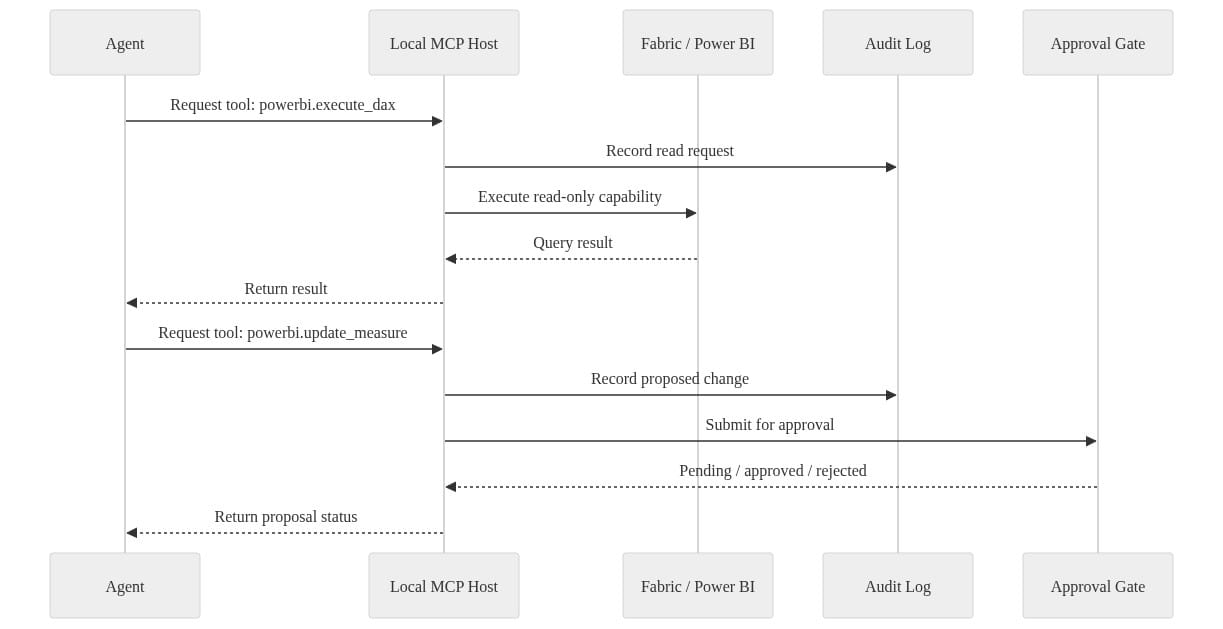
The thing to observe is that the approval gate is not bolted on after the fact. It sits in the sequence from the start.
The decision for Fabric leaders
The wrong question is whether Fabric will replace Foundry.
That’s not the pattern the product shape points to.
The better pattern is this:
- Foundry governs agent lifecycle, deployment, and orchestration
- Fabric provides analytics context, semantics, and data actions
- MCP connects the two with explicit tool boundaries
If I were funding this in a real enterprise, I’d start narrow:
- Pick one high-value semantic model.
- Expose read-oriented tools first.
- Measure semantic reliability, policy compliance, and handoff quality.
- Add proposal-based change tools only after the audit path is proven.
That last point matters. Success here is not “the chatbot looked smart.” Success is:
- the agent used the right business definitions
- the identity path was correct
- the action trail was reconstructable
- operations could own it after the pilot team left
For teams thinking beyond Fabric specifically, the same lesson shows up in Microsoft Foundry Agent Governance Production Checklist and in my governance work on enterprise agent memory: the winners separate experimentation from controlled execution early, not late.
My blunt take
Fabric Local MCP does not magically make Fabric an enterprise agent runtime.
It does something more important: it proves Fabric can expose governed analytical capabilities as tools. Once that happens, Fabric stops being just the place where reports and models live. It becomes a credible execution layer beneath agents.
That is a serious shift.
And if Microsoft keeps connecting semantic models, MCP tool surfaces, hosted endpoints, and managed agent services, Fabric becomes agent-runtime material in the only way that counts in the enterprise: not by talking more, but by acting through governed business semantics.
Where does this break in your environment: semantic-model ownership, approval latency, or the jump from local MCP to centrally managed agents?
#MicrosoftFabric #AIAgents #DataArchitecture
Sources & References
- Microsoft Fabric documentation - Microsoft Fabric
- Microsoft Foundry documentation
- Power BI Agentic Overview - Power BI
- What are the Power BI MCP servers? - Power BI
- Introduction to end-to-end analytics using Microsoft Fabric - Training
- What is Microsoft Foundry Agent Service? - Microsoft Foundry
- Guided Technical Labs
- Course DP-600T00-A: Implement analytics solutions using Microsoft Fabric - Training
- What is Fabric Apps (Preview)? - Microsoft Fabric
- Connect agents to MCP server endpoints - Microsoft Foundry
Try it yourself
Run this tutorial as a Jupyter notebook: Download runbook.ipynb (28 cells, 19 KB).



