Fabric Local MCP for Governed Agentic Analytics
How Fabric Local MCP Could Turn Microsoft Fabric Into an Agent Runtime

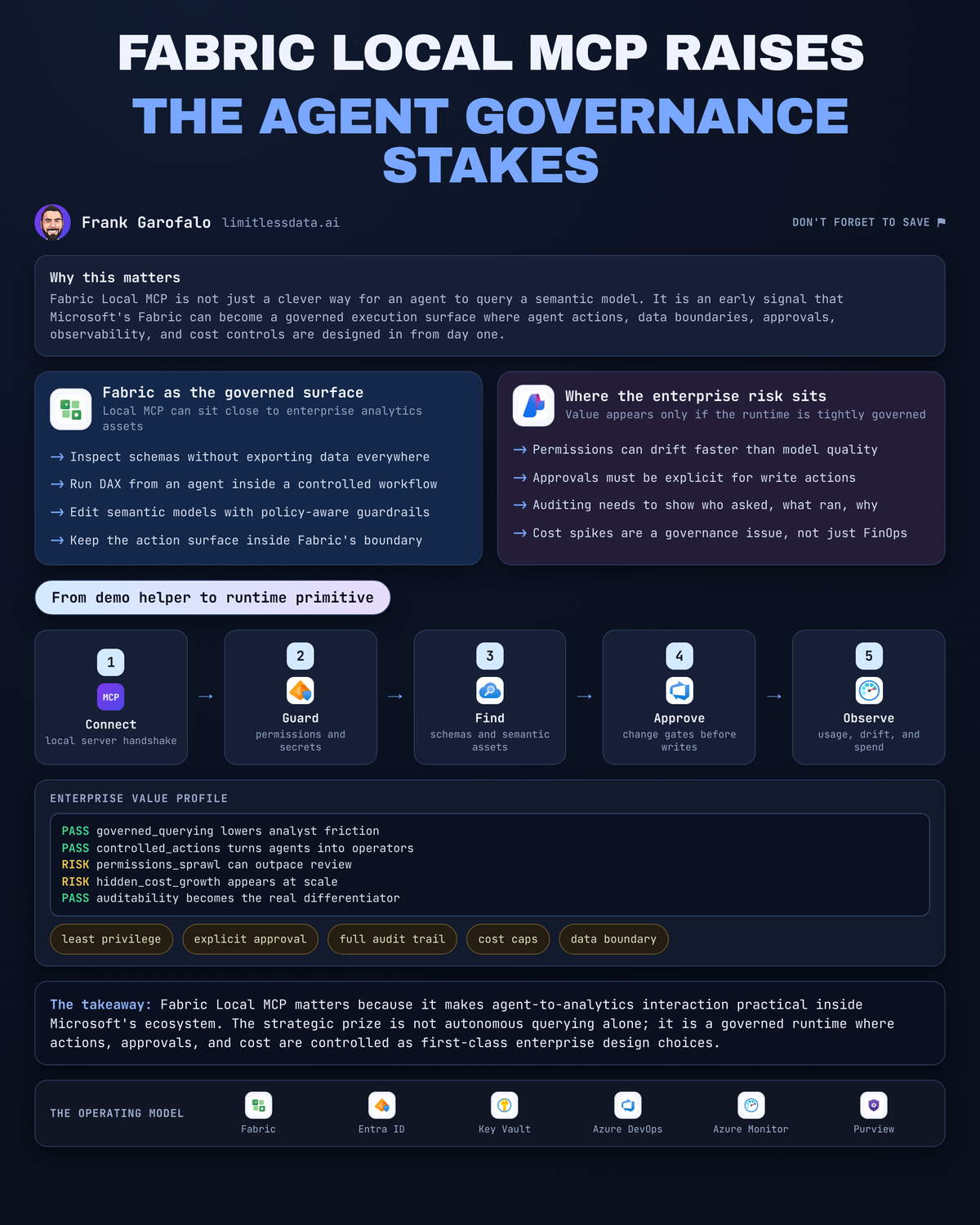
Three tool calls change the whole Fabric conversation: inspect schema, run DAX, edit the model. That’s enough to stop treating Fabric Local MCP as a cute demo and start treating it as the front door to an agent runtime.
On this page
- The quiet shift from assistant to execution surface
- Why Local MCP is more consequential than a DAX demo
- The emerging Microsoft agent path
- A control plane must arrive before broad autonomy
- Design the agent contract around least authority
- A practical tutorial: build the safe version first
- What CDOs should fund now
- The inflection point is governance, not autonomy
- Sources & References
Microsoft positions Fabric as a unified analytics platform for organizational data needs, and that matters here because unified platforms become execution surfaces fast when you add tool access per the Fabric overview. My take is simple: Fabric Local MCP is the first practical sign that Microsoft’s analytics stack can become a governed place where agents do work, not just answer questions about work.
If you’re a CDO, data platform lead, BI architect, or the poor soul who gets the 11:30 PM Teams message when “the AI did something weird,” this is the design shift to pay attention to.
The quiet shift from assistant to execution surface
Everybody loves the demo where an agent answers a business question against a semantic model.
That’s not the interesting part.
The interesting part starts when the agent can inspect the model, execute DAX against it, and make changes to the semantic layer. Microsoft’s Power BI agentic overview is explicit: the MCP server lets an agent inspect schemas, run DAX, and edit semantic models in Power BI Desktop or Microsoft Fabric per the Power BI agentic overview.
Once those capabilities exist, your architecture problem changes immediately.
You’re no longer tuning prompts for nicer prose. You’re deciding:
- which identity the agent runs under,
- which workspace it can touch,
- which artifacts are in bounds,
- which actions are read-only,
- which actions require approval,
- and how you will know what happened after the fact.
That’s the jump from assistant to execution surface.
Back in Q1, I watched a 14-person BI team spend nine days untangling a semantic-model change that originated from a “helpful” automation path nobody had properly scoped, and the root problem wasn’t model quality—it was authority without guardrails.
Fabric Local MCP is practical because it stops pretending analytics is just context stuffed into a prompt. It exposes concrete capabilities. That’s exactly why leaders should take it seriously.
Why Local MCP is more consequential than a DAX demo
The easy reaction is: “Great, an agent can run DAX.”
Fine. But DAX is not the story.
Tool access is the story.
The Power BI MCP server documentation draws a clean distinction between a Fabric-hosted service and a local option, and the local path has real setup requirements including Node.js 20.0+ per the MCP server overview. That sounds mundane. It isn’t. It tells you this is an actual runtime surface with operational shape, not a vague Copilot abstraction.
Here’s the mental model I want teams to use:
- chat without tools = suggestion engine
- chat with read tools = analytical assistant
- chat with read/write tools = governed operator, whether you admit it or not
That last category is where enterprises get burned if they stay lazy.
An unmanaged notebook script can already do damage. An isolated copilot can already confuse users. But an agent with tool access against governed analytics assets introduces a different class of risk and opportunity. Now the question is not “can the model figure it out?” The question is “what exactly is this thing allowed to do, under whose authority, and with what stop conditions?”
That is why I keep connecting this discussion to Fabric Copilot Hype Masks the Real AI Platform Bet. The bet was never the chat box. The bet is the execution plane behind it.
The emerging Microsoft agent path
You can already see the pieces lining up.
Microsoft Foundry Agent Service is the managed platform for building, deploying, and scaling agents, with tool orchestration and model inference exposed through the Responses API on a Foundry project endpoint per the Foundry Agent Service overview. Separately, Foundry’s MCP tooling guidance says agents can connect to MCP server endpoints, and it even calls out a Fabric data agent added through the Fabric IQ tool as an example per the MCP tools guidance.
That matters for one reason: MCP is moving from protocol talk to product reality across the Microsoft stack.
Add in:
- Fabric data agents, which Microsoft documents as being in preview for conversational Q&A over data,
- Microsoft IQ, which is clearly aimed at grounding agent interactions in shared organizational context,
- Agent Framework skill discovery from MCP-based skill sources,
- and now local and hosted MCP options around Power BI/Fabric assets,
and the direction is obvious even if the final operating model is still evolving.
I’m not saying Microsoft has handed you one magic “agent runtime” button inside Fabric. They haven’t.
I am saying the architecture path is visible enough that serious teams should evaluate Fabric as a governed execution layer for analytics-centric agents.
If you’ve read my post on Microsoft Foundry agent platform for enterprise operations, this is the same pattern showing up one layer deeper in the data estate: tools plus policy plus telemetry beats generic chat every single time.
A control plane must arrive before broad autonomy
Here’s where the excitement usually outruns the engineering.
If you let agents touch analytics assets before you define the control plane, you are building a future incident review, not a platform.
Start with identity.
The MCP server overview documents Microsoft Entra ID OAuth for the Fabric-hosted service, and Entra ID plus service principal authentication for the local option per the MCP server overview. Good. That means the identity story is not an afterthought. It also means your authentication choice is a governance choice.
Use delegated identity when the action needs strong user attribution and natural user-bound permissions. Use a service principal only when you can tightly scope the workspace and artifact boundary and you have audit discipline to match.
Then lock down the action surface.
A sane pattern looks like this:
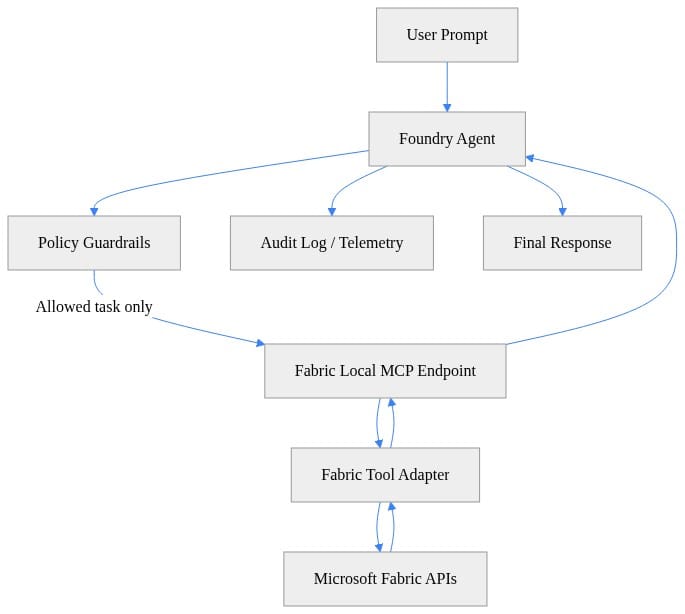
What to notice: policy sits between the agent and Fabric-facing tools. That is the whole game. Do not let the model decide what “reasonable access” means at runtime.
Next, implement a narrow contract for the tool itself. I’m showing a deliberately constrained agent config because this is how you keep blast radius small in the first month, not after the first incident.
# Conceptual Foundry agent config that binds to a local MCP endpoint with scoped permissions and audit metadata.
from dataclasses import dataclass, asdict
import json
from typing import List, Dict

@dataclass
class MCPToolConfig:
    name: str
    endpoint: str
    allowed_tasks: List[str]
    audit_fields: List[str]

agent_config = {
    "agent_name": "fabric-ops-agent",
    "model": "gpt-4.1",
    "instructions": "Use Fabric tools only for dataset refresh status and capacity inspection.",
    "tools": [
        asdict(MCPToolConfig(
            name="fabric-local-mcp",
            endpoint="http://127.0.0.1:3001/mcp",
            allowed_tasks=["get_refresh_status", "list_capacities"],
            audit_fields=["user_id", "tool_name", "task", "timestamp", "correlation_id"]
        ))
    ]
}

print(json.dumps(agent_config, indent=2))
What to notice: the agent is allowed to do two things, not twenty. Audit fields are explicit. Endpoint scope is explicit. That is how grown-up systems start.
Now put a simple policy gate in front of the tool calls. This example is intentionally lightweight, but it proves the point: classify the task, reject anything outside scope, and fail closed.
# Minimal policy gate that rejects prompts outside the MCP tool's permitted task scope.
ALLOWED_TASKS = {
    "get_refresh_status": ["refresh", "dataset", "status"],
    "list_capacities": ["capacity", "capacities", "sku"]
}

def classify_task(prompt: str) -> str | None:
    text = prompt.lower()
    for task, keywords in ALLOWED_TASKS.items():
        if any(word in text for word in keywords):
            return task
    return None

prompt = "Check the latest dataset refresh status for SalesSemanticModel"
task = classify_task(prompt)

if task is None:
    raise PermissionError("Prompt is outside the allowed MCP task scope.")

print({"prompt": prompt, "approved_task": task})
What to notice: if the prompt falls outside the approved task list, the agent stops. That sounds obvious. It is shocking how many “enterprise” agent demos skip this and go straight to unconstrained tool use.
Design the agent contract around least authority
Least privilege is too vague for agents. I prefer least authority.
Authority includes more than permissions. It includes approved tasks, allowed workspaces, allowed data domains, output destinations, escalation paths, and whether the action is reversible.
For Fabric Local MCP, I’d define the contract in five parts:
- Identity
- delegated Entra identity for read scenarios tied to a user - service principal only for bounded operational tasks - separate principals for read operations and change-capable operations
- Workspace scope
- one bounded workspace for the pilot - no cross-workspace traversal unless explicitly approved - no “temporary” broad access that becomes permanent six weeks later
- Tool scope
- read-only analytics tasks first - no semantic model edits in production until audit evidence is boringly complete - no chained workflow triggers without cost controls
- Output scope
- where can results land? - Teams message, ticket, log store, notebook, semantic model annotation? - output destinations are part of governance, not plumbing
- Human escalation
- what requires approval? - who approves? - what evidence do they see before clicking yes?
This is exactly the same pattern I’ve pushed in Enterprise Microsoft 365 Copilot Agent Governance Playbook: capability contracts beat broad permissions every time.
A practical tutorial: build the safe version first
Let me make this concrete.
If I were standing up a pilot in my lab or with an enterprise team, I would not start with “let the agent edit the semantic model.” I’d start with a read-focused operational workflow such as dataset refresh status and capacity inspection.
Step one: verify your local runtime prerequisites. The local MCP option has environment-specific setup, so fail fast before you waste an hour debugging nonsense.
# Verify local MCP prerequisites and fail fast if Node.js is missing or too old.
$ErrorActionPreference = "Stop"
$minimumMajor = 18

if (-not (Get-Command node -ErrorAction SilentlyContinue)) {
    throw "Node.js is required for local MCP hosting. Install Node.js $minimumMajor+."
}

$nodeVersionText = (& node --version).Trim().TrimStart("v")
$nodeMajor = [int]($nodeVersionText.Split(".")[0])

if ($nodeMajor -lt $minimumMajor) {
    throw "Detected Node.js $nodeVersionText. Upgrade to Node.js $minimumMajor or later."
}

Write-Host "Node.js prerequisite satisfied: v$nodeVersionText"
What to notice: check the runtime up front. In real projects, half the friction is boring prerequisites, and boring prerequisites kill confidence fast.
Step two: wire authentication deliberately. The local option supports Entra and service principal patterns. For a bounded pilot, I’d usually create a narrowly scoped service principal tied to one workspace and one use case, then document exactly why that principal exists.
# Securely supply Entra or service-principal settings through environment variables for a local MCP process.
$tenantId = Read-Host "Enter Entra Tenant ID"
$clientId = Read-Host "Enter App/Client ID"
$clientSecret = Read-Host "Enter Client Secret" -AsSecureString
$plainSecret = [System.Net.NetworkCredential]::new("", $clientSecret).Password

$env:FABRIC_MCP_AUTH_MODE = "service-principal"
$env:FABRIC_TENANT_ID = $tenantId
$env:FABRIC_CLIENT_ID = $clientId
$env:FABRIC_CLIENT_SECRET = $plainSecret
$env:FABRIC_WORKSPACE_ID = "00000000-0000-0000-0000-000000000000"

Write-Host "Environment variables set for current session."
Write-Host "Auth mode: $env:FABRIC_MCP_AUTH_MODE"
Write-Host "Tenant: $env:FABRIC_TENANT_ID"
What to notice: auth mode and workspace scope should be explicit and reviewable. If you can’t explain the principal’s boundary in one sentence, it’s too broad.
Step three: expose a tiny local MCP surface. This stub is intentionally small because the right first move is a narrow runtime, not a Swiss Army knife.
# Tiny local MCP endpoint stub showing how a Fabric tool could expose a narrow runtime surface.
from http.server import BaseHTTPRequestHandler, HTTPServer
import json

class MCPHandler(BaseHTTPRequestHandler):
    def do_POST(self):
        if self.path != "/mcp":
            self.send_response(404); self.end_headers(); return
        body = json.loads(self.rfile.read(int(self.headers.get("Content-Length", "0"))))
        task = body.get("task")
        if task not in {"get_refresh_status", "list_capacities"}:
            self.send_response(403); self.end_headers(); return
        response = {"ok": True, "task": task, "data": {"message": "Conceptual Fabric result"}}
        self.send_response(200)
        self.send_header("Content-Type", "application/json")
        self.end_headers()
        self.wfile.write(json.dumps(response).encode())

HTTPServer(("127.0.0.1", 3001), MCPHandler).serve_forever()
What to notice: only approved tasks return 200. Everything else gets blocked. That’s the shape you want even when the implementation becomes more sophisticated.
Step four: record every tool call with attributable metadata.
# Tool-call wrapper that records audit metadata before and after a conceptual MCP invocation.
from datetime import datetime, timezone
import json
import uuid

def call_mcp_tool(task: str, payload: dict, user_id: str) -> dict:
    correlation_id = str(uuid.uuid4())
    audit = {
        "user_id": user_id,
        "tool_name": "fabric-local-mcp",
        "task": task,
        "timestamp": datetime.now(timezone.utc).isoformat(),
        "correlation_id": correlation_id,
    }
    result = {"ok": True, "task": task, "data": {"status": "Completed"}}
    print(json.dumps({"audit": audit, "result_summary": result["ok"]}, indent=2))
    return result

response = call_mcp_tool("get_refresh_status", {"dataset": "SalesSemanticModel"}, "alice@contoso.com")
print(response)
What to notice: correlation ID, user ID, task name, timestamp. Without those four fields, your post-incident analysis will be guesswork and finger-pointing.
If you want to explain this flow to an architecture review board, sequence diagrams help. They also force you to confront where policy and audit actually sit.
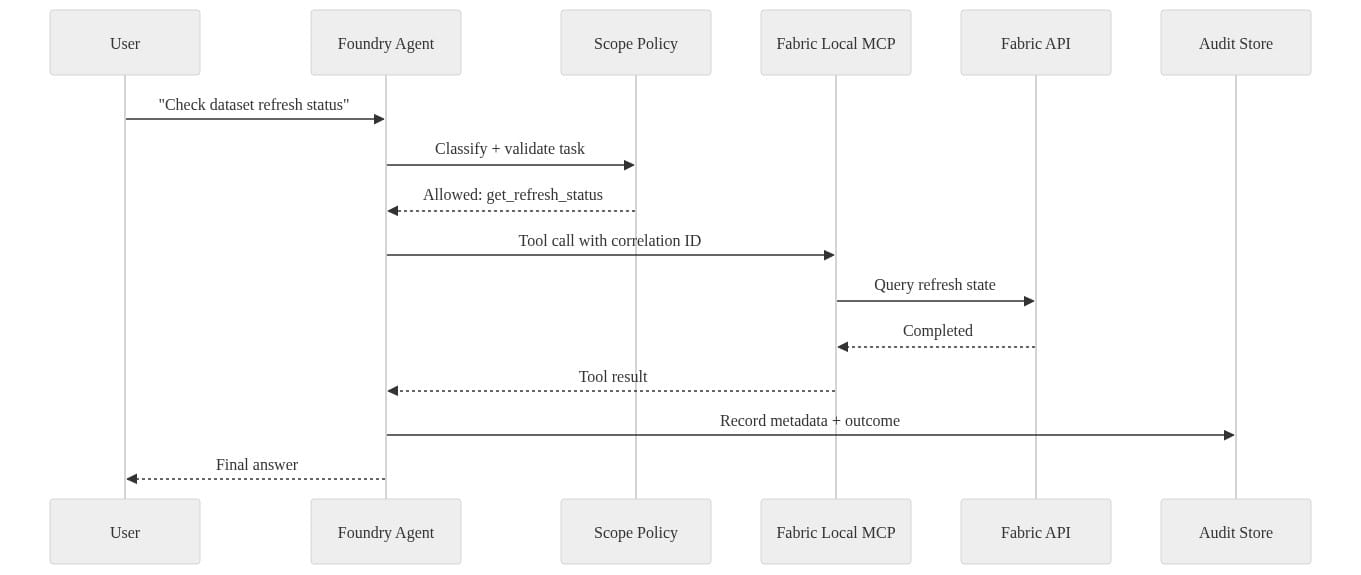
What to notice: audit is not a side note at the end. It is part of the transaction.
What CDOs should fund now
Don’t fund an “AI for analytics” science project.
Fund a narrow pilot with one high-value workflow, one bounded workspace, one accountable business owner, and one success metric tied to operational improvement.
Good pilot candidates:
- check dataset refresh status for executive dashboards
- inspect capacity or SKU state for BI operations
- answer governed Q&A over one certified semantic model
- summarize anomalies from a known analytical workflow without changing assets
Bad pilot candidates:
- broad semantic-model editing across multiple domains
- cross-workspace discovery with fuzzy ownership
- autonomous workflow triggering tied to downstream spend
- “let’s just see what it can do”
Measure the right things:
- authorization failures
- human escalations
- tool-call volume
- execution cost
- time-to-insight
- audit completeness
- false-positive and false-action rates
Also, validate your data boundaries before you get fancy. OneLake, semantic models, lakehouses, notebooks, workflow outputs—those are not interchangeable surfaces. If your catalog and ownership model are fuzzy, your agent runtime will inherit the fuzziness and amplify it. That’s why OneLake Catalog for Governed Microsoft Fabric Adoption is directly relevant here: catalog discipline becomes agent safety discipline.
The inflection point is governance, not autonomy
The wrong way to read Fabric Local MCP is “nice, now agents can query my model.”
The right way to read it is “Fabric is getting the ingredients to become a governed execution surface for enterprise analytics work.”
That is a much bigger deal.
The winners here won’t be the organizations that give agents the widest access first. They’ll be the ones that make every agent action legible, reversible, attributable, and economically bounded.
That means:
- policy before permissions sprawl,
- telemetry before scale,
- least authority before convenience,
- and approval loops before write access.
Fabric Local MCP matters because it makes agent-to-analytics interaction practical inside Microsoft’s ecosystem. The strategic opportunity is not autonomous querying by itself. The opportunity is designing Fabric so agent actions happen inside deliberate boundaries with clear identity, approval, telemetry, and cost control.
That’s the platform move.
Rate your team from 1 to 5 on this specific question: if an agent edited a semantic model in production tomorrow, could you prove who authorized it, what tool path it used, and what it cost?
#MicrosoftFabric #AIAgents #Datagovernance
Sources & References
- Microsoft Fabric documentation - Microsoft Fabric
- What are the Power BI MCP servers? - Power BI
- What is Microsoft Foundry Agent Service? - Microsoft Foundry
- Power BI Agentic Overview - Power BI
- Microsoft IQ documentation
- Get started with Microsoft Fabric - Training
- Connect agents to MCP server endpoints - Microsoft Foundry
- Fabric data agent creation - Microsoft Fabric
- Hosted agents in Foundry Agent Service - Microsoft Foundry
- Agent Skills
Try it yourself
Run this tutorial as a Jupyter notebook: Download runbook.ipynb (28 cells, 20 KB).