Realtime Voice Implications for Microsoft Copilot
What OpenAI’s Realtime Voice System Signals for Microsoft Copilot Experiences


780 milliseconds is the difference between “that felt natural” and “I’ll just type it.” Realtime voice turns Copilot from a prompt surface into a live interaction surface, and that changes what enterprise users will tolerate.
On this page
- The signal is a higher interaction standard
- Why the conversational bar changes
- Three Copilot arenas will feel this shift differently
- The enterprise constraint is governance at conversation speed
- Agents make voice more consequential
- A practical decision framework for leaders
- The durable takeaway
- Sources & References
The strategic test now is brutally simple: can the assistant respond fast enough, survive interruption, preserve context, and still stay inside enterprise guardrails?
That is the signal I take from OpenAI’s realtime voice direction. I’m not reading it as a parlor trick and I’m definitely not treating it as a reason to chase another demo. I’m reading it as a reset in interaction expectations for every Microsoft Copilot experience that wants to matter.
The signal is a higher interaction standard
A typed assistant gets away with a lot.
It gets away with awkward pauses. It gets away with users rephrasing from scratch. It gets away with brittle turn-taking. It gets away with losing the thread because the user can scroll up and rescue it.
Voice strips that slack out of the system. The minute an assistant speaks, users judge it like a person in the room. They expect four things:
- Response latency that feels immediate
- Interruption handling that lets them redirect mid-stream
- Conversational continuity across turns without repetitive setup
- Reliable handoff from conversation to work
That last one is the big one. Enterprise users do not want a charming voice toy. They want a system that can hear “pull the QBR deck, check the latest sales notes, and draft the follow-up,” then move between dialogue and business context without making them babysit every step.
Microsoft already has the substrate for this. Microsoft Graph is explicitly positioned as the gateway to data and intelligence in Microsoft 365, which is exactly why it matters in any serious Copilot interaction design Microsoft Graph docs. And Microsoft 365 Copilot already exposes multiple extension paths through connectors, plugins, agents, and APIs Microsoft 365 Copilot docs.
That combination is why this matters. Voice is not “another UI.” It is pressure on the whole interaction model.
Why the conversational bar changes
Typed chat is forgiving because the user does half the orchestration.
They wait. They scan. They edit their own phrasing. They decide when the turn starts and ends. Spoken interaction exposes every weakness in the system immediately. If latency spikes, everyone notices. If the assistant keeps talking after the user tries to correct it, trust drops fast. If context gets lost, the experience feels dumb even when the underlying model is strong.
A 14,000-seat manufacturing client I worked with in Q3 killed a voice pilot after week 3 because the assistant could answer correctly but could not stop speaking cleanly when plant supervisors interrupted to change a work-order number.
That failure had nothing to do with model IQ. It was an interaction failure.
Interruption is not a nice-to-have speech feature. It is the user’s control plane. In enterprise settings, interruption is how people constrain action, correct assumptions, and prevent bad downstream work. If a Copilot experience cannot handle barge-in cleanly, it is not enterprise-ready for consequential tasks.
Here’s the simplest possible mental model for the flow. Audio comes in, turn detection decides when the user is done or still speaking, reasoning selects tools, enterprise context gets pulled, and audio comes back out. That loop has to stay tight.
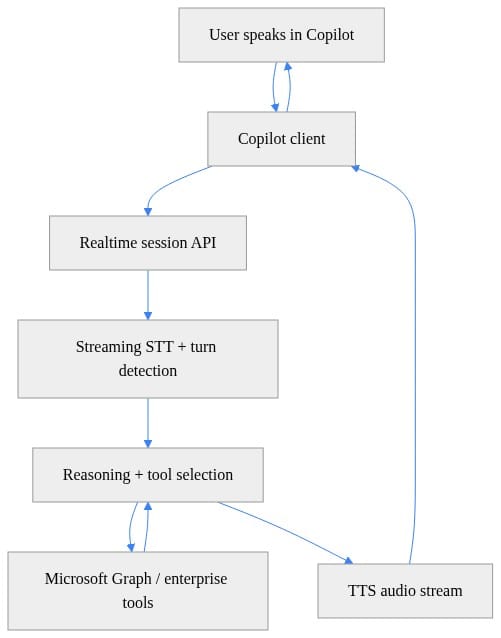
What to notice: the architecture is not complicated on paper. The hard part is the timing, policy, and context boundaries between each hop.
Three Copilot arenas will feel this shift differently
1) Workplace Copilot
This is the easiest place to overhype and the easiest place to get real value.
The best voice scenarios in Microsoft 365 are not “talk to your documents all day.” They are high-context, short-burst moments:
- “What changed in the deck since yesterday?”
- “Summarize the thread before my 2 PM”
- “Pull the three action items from that meeting and draft the follow-up”
- “Find the doc Alex mentioned in the budget review”
That works because the user is already in motion. They are switching windows, joining meetings, reviewing files, and triaging requests. Voice helps when speaking is faster than navigating.
The context layer here is obvious: calendar, mail, files, meetings, people, permissions. That is why Graph matters so much. If your access design is sloppy, your voice experience will be sloppy too. The assistant can only be as useful as the identity and data boundaries underneath it.
2) Contact center
Voice raises the stakes here immediately.
A natural conversation creates the impression of competence long before the system has earned it. That is dangerous in service environments. The real challenge is not whether the assistant sounds good. The challenge is whether escalation is accurate, customer context is correct, recording policy is enforced, and the line between “assist the human” and “act autonomously” is explicit.
If the system retrieves the wrong account, misses a compliance disclaimer, or hands off without preserving context, the damage is operational, not cosmetic.
This is where I’d push teams to separate assistive flows from action-taking flows early. Let the system summarize, retrieve, and recommend before you let it commit changes.
3) Frontline and field work
This is where voice can be genuinely transformative because hands-busy work is real work.
Warehouse staff, field technicians, nurses, plant operators, retail associates—these users do not want a chat box. They want fast, bounded, identity-aware interactions tied to approved systems. “Read me the next task.” “Show the maintenance history.” “Log this issue against asset 4427.” “What changed in today’s safety bulletin?”
Narrow scope wins here. Tight permissions win here. Deterministic fallbacks win here.
If you want the strategic frame for this broader shift, I made a similar point in Microsoft Copilot Just Changed Your Knowledge Work Stack: the interface matters less than the control plane behind it.
The enterprise constraint is governance at conversation speed
This is the part too many teams leave for “phase two,” which is how they end up rebuilding the whole thing.
A faster interface compresses the time available for a user to notice, challenge, or stop an AI action. That means governance has to operate at conversation speed too.
You need two records, not one:
- Conversational record: what was said, what context was used, what the assistant proposed
- Business-action record: what was approved, what system changed, who authorized it, what tool executed it
Those are not interchangeable.
Microsoft 365 Copilot Chat already documents an important baseline: with enterprise data protection, prompts and responses are logged, retained, and available for audit, eDiscovery, and advanced eDiscovery Copilot FAQ. That matters because voice experiences will be judged against the same enterprise expectations around retention, review, and traceability.
So before anyone optimizes for “naturalness,” do the boring grown-up work:
- bind interactions to identity
- enforce least privilege
- define confirmation boundaries
- classify reversible vs irreversible actions
- establish retention rules
- design escalation paths
If you skip that, the demo will look great and the rollout will die in security review.
A simple guardrail example makes the point. Some information should never be spoken aloud, even if the user technically has access. Spoken output changes the risk profile in shared spaces, on speakerphones, and in frontline environments.
# Python: Guardrail pattern for enterprise-safe voice responses
def enforce_policy(text: str) -> str:
    blocked = ["password", "secret key", "token"]
    if any(term in text.lower() for term in blocked):
        return "I can’t read sensitive credentials aloud. I can help you rotate or store them securely."
    return text

samples = [
    "Your next meeting is at 2 PM.",
    "The password for the admin account is ...",
]

for s in samples:
    print(enforce_policy(s))
What to notice: policy enforcement for voice is not just about what the model knows. It is about what the channel should say out loud.
Agents make voice more consequential
The moment voice connects to multi-step work, the stakes jump.
Microsoft’s own framing already separates chat-oriented assistance from agentic execution. Microsoft describes Copilot Chat as an always-on AI for drafting, summarizing, and answering questions, while Copilot Cowork is positioned around agentic, multi-step work Copilot Cowork FAQ. That distinction is exactly why voice needs stronger control mechanics, not weaker ones.
A voice assistant that answers a question is one thing.
A voice-triggered agent that can retrieve context, invoke tools, draft outputs, and advance work across systems is a very different beast. Now interruption, confirmation, and observability are non-negotiable.
Copilot Studio matters here too. Microsoft positions it as a way for organizations to create agents for business scenarios that customers and employees can interact with. That tells you where this is heading organizationally: channels, policy, lifecycle, and ownership become first-class design decisions.
My rule of thumb is simple. Do not use the same voice interaction pattern for all actions. Split them into four buckets:
- Information retrieval
Low-risk, often no confirmation needed.
- Draft generation
Medium-risk, user review expected.
- Reversible changes
Explicit confirmation and clean rollback required.
- Irreversible or regulated actions
Strong confirmation, audit trail, and often human approval.
That action taxonomy is where a lot of organizational prompt governance work becomes operational instead of theoretical.
A practical decision framework for leaders
Here’s how I’d evaluate voice-capable Copilot scenarios this quarter if I were running the program.
Start with use cases where speaking is materially easier than typing, the context is bounded, and a quick clarification has real value. Then score each scenario on seven dimensions:
- latency sensitivity
- interruption frequency
- continuity requirements
- data sensitivity
- action authority
- audit requirements
- fallback-to-human need
If a scenario scores high on sensitivity and action authority before you’ve proven traceability, don’t ship it.
If it scores high on interruption frequency and your stack cannot barge-in cleanly, don’t ship it.
If it depends on broad, fuzzy context with weak permissions hygiene, definitely don’t ship it.
The fastest way to make this concrete is to instrument the latency path. Teams talk vaguely about “real time” and then discover they have 200 ms in capture, 300 ms in tool invocation, 400 ms in synthesis, and a terrible user experience.
# PowerShell: Log latency checkpoints that matter for a voice-first Copilot experience
$checkpoints = [ordered]@{
  CaptureStartMs = 0
  FirstTranscriptMs = 180
  ToolCallStartMs = 320
  ToolCallEndMs = 640
  FirstAudioOutMs = 780
}

foreach ($item in $checkpoints.GetEnumerator()) {
  "{0}: {1} ms" -f $item.Key, $item.Value
}

$total = $checkpoints["FirstAudioOutMs"] - $checkpoints["CaptureStartMs"]
"End-to-first-audio latency: $total ms"
What to notice: end-to-first-audio latency is the user’s truth metric. If that number drifts, your adoption will drift with it.
Next, make the context path explicit. A voice experience without grounded enterprise data is just a talking model. A voice experience with grounded but over-broad enterprise data is a governance incident waiting to happen.
# PowerShell: Example of grounding a Copilot response with Microsoft Graph-style context
$graphContext = @{
  user = "alex@contoso.com"
  nextMeeting = "Quarterly planning at 2:00 PM"
  unreadEmails = 14
  topDocument = "FY26-Strategy.docx"
}

$prompt = @"
You are Microsoft Copilot.
Use this enterprise context to answer the user:
$($graphContext | ConvertTo-Json -Compress)
"@

$prompt
What to notice: the useful pattern is bounded context, not unlimited retrieval. Give the assistant the minimum relevant facts for the task.
And if you’re designing pilots, keep them assistive and reversible first. That lesson shows up in every successful rollout I’ve seen, including the change management patterns I covered in this Microsoft 365 Copilot case study.
The durable takeaway
Realtime voice is not a reason to chase a voice demo. It is an experience-design pressure test on your Copilot strategy.
Future Copilot experiences will be judged on live-dialogue qualities:
- how fast they respond
- whether users can interrupt them
- whether they preserve task continuity
- whether they can move from conversation to work safely
- whether all of that remains governable inside enterprise identity, data protection, and audit controls
That is the bar now.
The organizations in the best position are not the ones with the flashiest voice prototype. They are the ones building governed conversational foundations now: connected data, strong identity, explicit agent boundaries, auditable records, and workflow-specific controls.
Fast interaction only matters if it stays compatible with deliberate oversight.
Rate your team from 1 to 5 on this specific question: if Copilot became voice-first tomorrow, how ready are your identity, audit, and confirmation boundaries for real work?
#Microsoft365copilot #EnterpriseAI #DataArchitecture
Sources & References
- Microsoft Graph documentation
- Microsoft 365 Copilot hub
- Frequently asked questions about Microsoft 365 Copilot Chat
- What's new in Copilot Studio - Microsoft Copilot Studio
- Copilot Cowork common questions
- Microsoft 365 developer documentation - Microsoft 365 Developer
- Overview of Copilot in Fabric - Microsoft Fabric
- Transform Your Everyday Business Processes with Agents MS-4019 - Training
- Get started with Microsoft Copilot Studio - Training
- Decide which Copilot is right for you
Try it yourself
Run this tutorial as a Jupyter notebook: Download runbook.ipynb (35 cells, 24 KB).